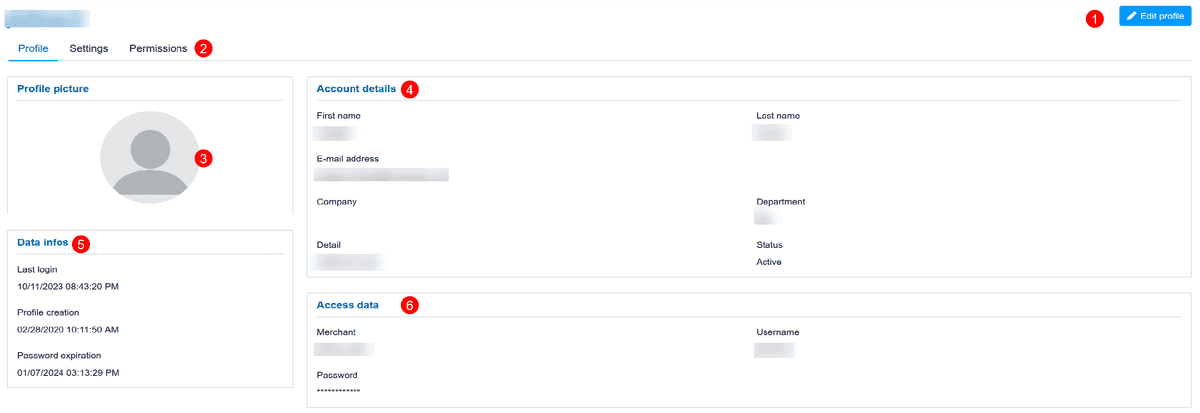
On this form you can view and edit your profile data:
Common
| Edit profile |

Here you may activate the edit mode for your user profile.
Profile
| Profile sections |

Your user profile consist of three setups:
Profile: some account data like system data (created, password expiration, last login time), firstname, lastname, email address (e.g. for password reset), ...
Settings: date/time and number/currency format, number of result rows, ...
Permissions: either view or edit your permissions – depending on your user profile permissions
| Profile picture |

Here you may upload a personal image / picture – or your company logo.
| Account details |

Here are some personal information like your email address which is used for password reset.
| Data infos |

There it's displayed when you logged in last time, when your user profile has been created, ...
| Access data |

The MerchantId and username assigned to your profile can not be changed.
Your password can be changed if you edit your user profile.
Settings
| Profile sections |
Your user profile consist of three setups:
Profile: some account data like system data (created, password expiration, last login time), firstname, lastname, email address (e.g. for password reset), ...
Settings: date/time and number/currency format, number of result rows, ...
Permissions: either view or edit your permissions – depending on your user profile permissions
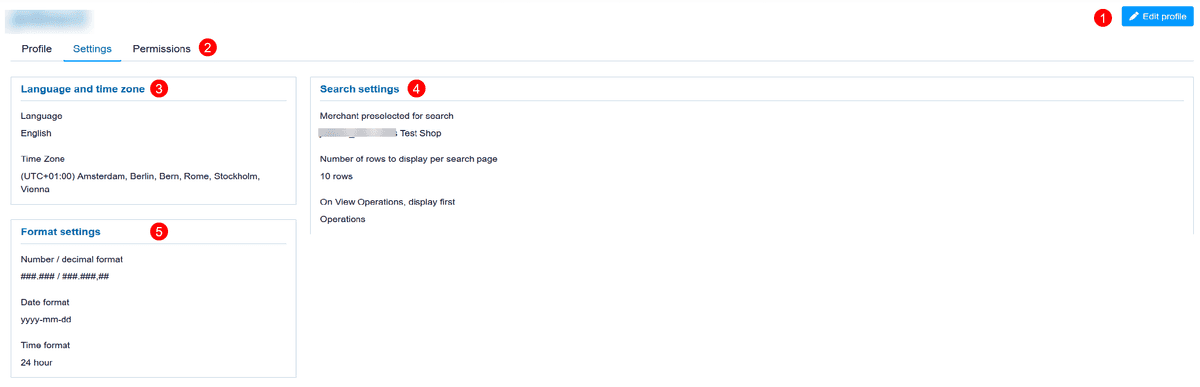
| Language and time zone |
Language: is the initial language used after login – and may be changed via language dropdown on the top right of the form.
Time Zone: is your local time zone.
| Search settings |
This setting is valid for searching your payment operations/transactions.
Merchant preselected: in case you have multiple merchantIds assigned to your user profile you may define here your favorite to start with.
Number of rows: preselect standard number of rows to display, e.g. 10, 25, 50
On View Operations: you may either start with "Operations" (showing 1 payment process per row) or with "Transactions" (showing each transaction in a new row)