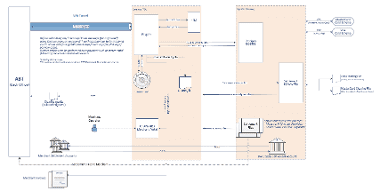
System diagram
Below is a detailed system diagram describing the connectivity between different stakeholders and the functionalities provided by each entity in the MTT Echo system.
Paygate interface
Definitions
Data formats
Format | Description |
a | alphabetical |
as | alphabetical with special characters |
n | numeric |
an | alphanumeric |
ans | alphanumeric with special characters |
ns | numeric with special characters |
bool | boolean expression (true or false) |
3 | fixed length with 3 digits/characters |
..3 | variable length with maximum 3 digits/characters |
enum | enumeration of allowed values |
dttm | ISODateTime (YYYY-MM-DDThh:mm:ss) |
Abbreviations
Abbreviation | Description | Comment |
CND | condition | |
M | mandatory | If a parameter is mandatory, then it must be present |
O | optional | If a parameter is optional, then it can be present, but it is not required |
C | conditional | If a parameter is conditional, then there is a conditional rule which specifies whether it is mandatory or optional |
Notice: Please note that the names of parameters can be returned in upper or lower case.
POS initiated transaction types (aggregated / deferred authorizations)
Below the interfaces description, relevant for submitting Mass Transportation transaction types.
https://www.computop-paygate.com/posPayment.aspx
Notice: For security reasons, Computop Paygate rejects all payment requests with formatting errors. Therefore, please use the correct data type for each parameter.
The following table describes the encrypted payment request parameters:
| Key | Format | CND | Description |
|---|---|---|---|
MessageType | an2 | M | Message type for the request. Allowed values: 01 Sale (two step transaction) 05 Pre-Authorization, Authorization |
ans..30 | M | MerchantID, assigned by Computop. Additionally this parameter has to be passed in plain language too. | |
ans..64 | M | TransactionID provided by you which should be unique for each payment | |
RefNr | ans..30 | O | Merchant’s unique reference number For DCC: dccReferenceData (reference of DCC request) |
Amount | n..10 | M | Amount in the smallest currency unit (e.g. EUR Cent). For DCC: Amount in foreign currency |
Currency | a3 | M | Currency, three digits DIN / ISO 4217 For DCC: Foreign currency |
LocalDate | n4 | M | Local Date of the transaction. Format: MMDD |
LocalTime | n6 | M | Local Time of the transaction. Format: hhmmss |
POSTerminalID | an..20 | M | TerminalID of the POS device |
Device | an16 | M | Serial number of POS device |
CCNr | n8..19 | C | PAN of the card. For credit cards only the number. For ELV the PAN consisting of country prefix, short sort code, account number and check digit |
CCBrand | an..22 | M | Brand: VISA, MasterCard, Maestro, AMEX, DINERS, JCB, CUP. Please note spelling! For ELV always use SEPAELV! |
CCCVC | n..4 | O | Card validation code: The last 3 digit next to the signature field on the card, 4 digits for AMEX |
CCExpiry | n6 | M | Mandatory for credit cards. Expiry date of the card (YYYYMM), e.g. 202207 |
CCSeqNr | n3 | O | Card sequence number |
Track2 | an..224 | C | Mandatory for magnet stripe read (MSR). Data of track2 for MSR or Track2Equivalent (Tag 57) (hex representation) |
EMVData | an..2048 | C | EMV data that is forwarded to the acquirer (BER TLV hex representation). Drop this parameter if there is no EMV data, e.g. MSR |
EntryMode | n3 | C | Mandatory for credit cards. POS Entry Mode (Tag 9F39) |
OrderDesc | ans..200 | O | Description of sold goods, unit price, etc. |
AccVerify | a..3 | O | Allowed value: YES Used to initiate an account verification (zero value auth). Amount may be zero. |
an64 | M | Hash Message Authentication Code (HMAC) with SHA-256 algorithm. Details can be found here: | |
ChDesc | ans..25 | O | Text printed on the customer’s credit card bill alongside the payee. Note: For MasterCard the length is limited to 22 while for VISA 25. |
subMIDAddrCity | ans..13 | O | This field is used to override the default Merchant City in the Authorization request. (A PTO aggregator ID can be passed through) |
subMIDName | ans..25 | O | This field is used to override the default Merchant Name in the Authorization request. (A PTO aggregator ID can be passed through) |
DataEncrypted | an..2048 | O | Merchant can submit the encrypted value of (PAN + Track 2 Equivalent Data in TLV format). If case this field is provided the CCNr is not required. |
DataKSN | an..20 | C | KSN value generated from the terminal and required to decrypt the data present in 'DataEncrypted' parameter. |
Request parameter for POS payments
The following table describes the result parameters with which the Computop Paygate responds to your system
pls. be prepared to receive additional parameters at any time and do not check the order of parameters
the key (e.g. MerchantId, RefNr) should not be checked case-sentive
| Key | Format | CND | Description |
|---|---|---|---|
MessageType | an2 | M | Message type for the request |
ans..30 | M | MerchantID, assigned by Computop | |
an32 | M | ID assigned by Paygate for the payment, e.g. for referencing in batch files as well as for capture or credit request. | |
an32 | M | ID for all single transactions (authorisation, capture, credit note) for one payment assigned by Paygate | |
ans..64 | M | TransactionID provided by you which should be unique for each payment | |
a..50 | M | OK (URLSuccess) or FAILED (URLFailure) | |
ans..1024 | M | Further details in the event that payment is rejected. Please do not use the Description but the Code parameter for the transaction status analysis! | |
an8 | M | Error code according to Paygate Response Codes (A4 Error codes) | |
ans..30 | O | Merchant’s unique reference number | |
POSTerminalID | an..20 | M | TerminalID of the pin entry device |
CodeExt | an2 | M | Acquirer response code |
Approvalcode | n..6 | C | Only for credit card, only if configured: Authorization code form the authorization response |
EMVData | an..2048 | C | For credit card: Acquirer response (hex representation). Consists of ‚Issuer Authorization Response Code‘ (Tag 8A), Issuer Scripts (Tag 71, 72), Issuer Authentication Data (Tag 91) etc. For ELV: IBAN (Tag 5F53) and Creditor ID (Tag DF65), format see annex EMV Data elements |
VUNr | ans..20 | O | Only for credit card: Contract partner number. Configured in merchant settings. |
TerminalID | ans..20 | O | Only for credit card: ID, used for data exchange between Computop and the acquirer. Configured in merchant settings.Beschreibung |
AQ | ans..30 | O | Only if configured: Acquirer shortcut |
TrxTime | ans21 | O | Time stamp of transaction in the format dd.MM.yyyy HH:mm:ssff |
additionalresponsedata | an..128 | O | Only for credit card, only if configured: Additional Response Data taken from acquirer response |
n16 | O | Pseudo Card Number: Random number generated by Computop Paygate which represents a genuine credit card number. The pseudo card number (PCN) starts with 0 and the last 3 digits correspond to those of the real card number. The PCN can be used like a genuine card number for authorisation, capture and credits. PCNr is a response value from Computop Paygate and is sent as CCNr in Request or part of card-JSON | |
Last4CardholderPAN | n..4 | O | VISA last 4 digits of the embossed PAN when tokenised DPAN was used in the request |
PAR | ans…999 | O | Payment Account Reference data provided by VISA/MC used mainly by MTT merchants to identify a customer in their back-office system |
EmbossedPANPCNr | n..19 | O | (MC/Maestro only) Provided only for Mass Transit transaction types and is a second CT PKN that it refers to the Embossed PAN of the physical card. Received in Acquirer response when tokenised PAN was send in request. |
EmbossedPANExpiryDate | n..4 (YYMM) | O | (MC/Maestro only) Provided only for Mass Transit transaction types and is the expiration date of the Embossed PAN received from the Acquirer in response. |
OriginalCode | ans..3 | O | Contains the original response code (BM 60.68 Scheme response code) from payment schemes authorization platforms. |
schemeReferenceID | ans..64 | O | Card scheme specific transaction ID required for subsequent credential-on-file payments, delayed authorizations and resubmissions. |
Response parameter for POS payments
POS incremental (Maestro scenario)
https://www.computop-paygate.com/posPayment.aspx
Notice: For security reasons, Computop Paygate rejects all payment requests with formatting errors. Therefore, please use the correct data type for each parameter.
The following table describes the encrypted payment request parameters:
| Key | Format | CND | Description |
|---|---|---|---|
MessageType | an2 | M | Message type for the request. Will be returned in the response. Allowed value: 06 |
ans..30 | M | MerchantID, assigned by Computop. Additionally this parameter has to be passed in plain language too. | |
an32 | M | ID assigned by Paygate for the payment, e.g. for referencing in batch files as well as for capture or credit request. | |
ans..64 | M | TransactionID provided by you which should be unique for each payment | |
an64 | M | Hash Message Authentication Code (HMAC) with SHA-256 algorithm. Details can be found here: | |
ans..30 | O | Merchant’s unique reference number | |
n..10 | M | Amount in the smallest currency unit (e.g. EUR Cent). Please contact the Computop Helpdesk, if you want to capture amounts <100 (smallest currency unit). | |
a3 | M | Currency, three digits DIN / ISO 4217, e.g. EUR, USD, GBP. Please find an overview here: A1 Currency table | |
LocalDate | n4 | M | Local Date of the transaction. Format: MMDD |
LocalTime | n6 | M | Local Time of the transaction. Format: hhmmss |
POSTerminalID | an..20 | M | TerminalID of the pin entry device |
Device | an16 | M | Serial number of pin entry device |
EntryMode | n3 | M | Mandatory for credit cards. POS Entry Mode. |
CCSeqNr | n3 | C | Required in all transactions where chip-card is present and the chip card contains a Card Sequence Number, otherwise optional in requests. |
Track2 | an..224 | C | Mandatory for Magnetic Stripe Read (MSR). Data of track 2 with MSR or Track2EquivalentData (tag 57) (in hex formatting). |
EMVData | an..2048 | C | EMV data as required for passing on to the acquirer (in hex formatting). The exact structure is determined by the protocol used, which is stored in the master data of the terminal. If no EMV data is available, e.g. for MSR, then omit this parameter completely. |
DataEncrypted | an..2048 | O | Merchant can submit the Encrypted value of (PAN + Track 2 Equivalent Data in TLV format). This only in case the Merchant cannot handle clear text data as a non-PCI DSS. |
DataKSN | an..20 | C | KSN value generated from the terminal and required to decrypt the data present in 'DataEncrypted' parameter. |
Parameters for Incremental
The following table describes the result parameters with which the Computop Paygate responds to your system
pls. be prepared to receive additional parameters at any time and do not check the order of parameters
the key (e.g. MerchantId, RefNr) should not be checked case-sentive
| Key | Format | CND | Description |
|---|---|---|---|
MessageType | an2 | M | Message type for the request |
ans..30 | M | MerchantID, assigned by Computop | |
an32 | M | ID assigned by Paygate for the payment, e.g. for referencing in batch files as well as for capture or credit request. | |
an32 | M | ID for all single transactions (authorisation, capture, credit note) for one payment assigned by Paygate | |
ans..64 | M | TransactionID provided by you which should be unique for each payment | |
n..10 | M | Amount in the smallest currency unit (e.g. EUR Cent). Please contact the Computop Helpdesk, if you want to capture amounts <100 (smallest currency unit). | |
a3 | M | Currency, three digits DIN / ISO 4217, e.g. EUR, USD, GBP. Please find an overview here: A1 Currency table | |
a..50 | M | OK (URLSuccess) or FAILED (URLFailure) | |
ans..1024 | M | Further details in the event that payment is rejected. Please do not use the Description but the Code parameter for the transaction status analysis! | |
an8 | M | Error code according to Paygate Response Codes (A4 Error codes) | |
CodeExt | an2 | M | Acquirer response code |
POSTerminalID | an..20 | M | TerminalID of the pin entry device |
VUNr | ans..20 | O | Only for credit card: Contract partner number. Configured in merchant settings. |
TerminalID | ans..20 | O | Only for credit card: ID, used for data exchange between Computop and the acquirer. Configured in merchant settings.Beschreibung |
AQ | ans..30 | O | Only if configured: Acquirer shortcut |
TrxTime | ans21 | O | Time stamp of transaction in the format dd.MM.yyyy HH:mm:ssff |
OriginalCode | ans3 | O | Card Scheme original response code |
Response parameters for Incremental
Manual reversal (POS)
https://www.computop-paygate.com/posPayment.aspx
Notice: For security reasons, Computop Paygate rejects all payment requests with formatting errors. Therefore, please use the correct data type for each parameter.
The following table describes the encrypted payment request parameters:
| Key | Format | CND | Description |
|---|---|---|---|
MessageType | an2 | M | Message type for the request. Will be returned in the response. Allowed value: 02 |
ans..30 | M | MerchantID, assigned by Computop. Additionally this parameter has to be passed in plain language too. | |
an32 | M | ID assigned by Paygate for the payment, e.g. for referencing in batch files as well as for capture or credit request. | |
ans..64 | M | TransactionID provided by you which should be unique for each payment | |
an64 | M | Hash Message Authentication Code (HMAC) with SHA-256 algorithm. Details can be found here: | |
ans..30 | O | Merchant’s unique reference number | |
n..10 | M | Amount in the smallest currency unit (e.g. EUR Cent). Please contact the Computop Helpdesk, if you want to capture amounts <100 (smallest currency unit). | |
a3 | M | Currency, three digits DIN / ISO 4217, e.g. EUR, USD, GBP. Please find an overview here: A1 Currency table | |
POSTerminalID | an..20 | M | TerminalID of the pin entry device |
Device | an16 | M | Serial number of pin entry device |
Parameters for reversal
The following table describes the result parameters with which the Computop Paygate responds to your system
pls. be prepared to receive additional parameters at any time and do not check the order of parameters
the key (e.g. MerchantId, RefNr) should not be checked case-sentive
| Key | Format | CND | Description |
|---|---|---|---|
MessageType | an2 | M | Message type for the request |
ans..30 | M | MerchantID, assigned by Computop | |
an32 | M | ID assigned by Paygate for the payment, e.g. for referencing in batch files as well as for capture or credit request. | |
an32 | M | ID for all single transactions (authorisation, capture, credit note) for one payment assigned by Paygate | |
ans..64 | M | TransactionID provided by you which should be unique for each payment | |
n..10 | M | Amount in the smallest currency unit (e.g. EUR Cent). Please contact the Computop Helpdesk, if you want to capture amounts <100 (smallest currency unit). | |
a3 | M | Currency, three digits DIN / ISO 4217, e.g. EUR, USD, GBP. Please find an overview here: A1 Currency table | |
a..50 | M | OK (URLSuccess) or FAILED (URLFailure) | |
ans..1024 | M | Further details in the event that payment is rejected. Please do not use the Description but the Code parameter for the transaction status analysis! | |
an8 | M | Error code according to Paygate Response Codes (A4 Error codes) | |
CodeExt | an2 | M | Acquirer response code |
POSTerminalID | an..20 | M | TerminalID of the pin entry device |
VUNr | ans..20 | O | Only for credit card: Contract partner number. Configured in merchant settings. |
TerminalID | ans..20 | O | Only for credit card: ID, used for data exchange between Computop and the acquirer. Configured in merchant settings.Beschreibung |
AQ | ans..30 | O | Only if configured: Acquirer shortcut |
TrxTime | ans21 | O | Time stamp of transaction in the format dd.MM.yyyy HH:mm:ssff |
OriginalCode | ans3 | O | Card Scheme original response code |
Response parameters for reversal
Automatic debt recovery (MIT & VISA resubmission)
Chart of process flow via Server-to-Server
For the server-to-server payment processes please refer to the programming basics manual.

Process flow of a payment via server-to-server interface
Call of interface: general parameters
To carry out a TLS Notify via a Server-to-Server connection, please use the following URL:
https://www.computop-paygate.com/direct.aspx
Notice: For security reasons, Computop Paygate rejects all payment requests with formatting errors. Therefore, please use the correct data type for each parameter.
The following table describes the encrypted payment request parameters:
| Key | Format | CND | Description | ||||||||
|---|---|---|---|---|---|---|---|---|---|---|---|
ans..30 | M | MerchantID, assigned by Computop. Additionally this parameter has to be passed in plain language too. | |||||||||
ans..64 | M | TransactionID provided by you which should be unique for each payment | |||||||||
n..10 | M | Amount in the smallest currency unit (e.g. EUR Cent). Please contact the Computop Helpdesk, if you want to capture amounts <100 (smallest currency unit). | |||||||||
Amount3D | n..12 | C | Only for 3DSecure: Amount for authentication with Verified, SecureCode and SafeKey if Amount deviates. E.g. Customer confirms flight costs of 120 Euros with 'Verified' but the travel agent captures only the booking fee of 20 Euros: Amount3D=12000; Amount=2000. Amount in the smallest currency unit (e.g. EUR Cent). Please contact the Computop Helpdesk, if you want to capture amounts < 100 (smallest currency unit). | ||||||||
a3 | M | Currency, three digits DIN / ISO 4217, e.g. EUR, USD, GBP. Please find an overview here: A1 Currency table | |||||||||
CCNr | n..19 | M | Credit card number at least 12-digit, numerical without spaces. You can optionally transmit also a pseudo card number (PCN). | ||||||||
CCCVC | n..4 | O | Optional, not with ATOS: Card verification number: The last 3 digits on the signature strip of the credit card, 4 numbers in the case of American Express. Mandatory for Clearhaus | ||||||||
CCExpiry | n6 | M | Expiry date of the credit card in the format YYYYMM, e.g. 202707 | ||||||||
CCBrand | a..22 | M | Credit card brand. Please note the spelling! According to table of credit card brands! | ||||||||
an..6 | OM | Determines the type and time of capture.
| |||||||||
ans..32 | O | To avoid double payments or actions (e.g. by ETM), enter an alphanumeric value which identifies your transaction and may be assigned only once. If the transaction or action is submitted again with the same ReqID, Computop Paygate will not carry out the payment or new action, but will just return the status of the original transaction or action. Please note that the Computop Paygate must have a finalized transaction status for the first initial action (authentication/authorisation). This does not apply to 3-D Secure authentications that are terminated by a timeout. The 3-D Secure Timeout status does not count as a completed status in which the ReqID functionality on Paygate does not take effect. Submissions with identical ReqID for an open status will be processed regularly. Notice: Please note that a ReqID is only valid for 12 month, then it gets deleted at the Paygate. | |||||||||
an64 | M | Hash Message Authentication Code (HMAC) with SHA-256 algorithm. Details can be found here: | |||||||||
TermURL | ans..256 | C | Only for 3DSecure: URL of the shop which has been selected by the Access Control Server (ACS) of the bank to transmit the result of the authentication. The bank transmits the parameters PayID, TransID and MerchantID via GET and the PAResponse parameter via POST to the TermURL. | ||||||||
UserAgent | ans..128 | C | Only for 3DSecure: Browser type of the purchaser who requests the page. For example: IE Mozilla/4. 0 (compatible; MSIE 6.0; Windows NT 5.0; NET CLR 1.0.3705) | ||||||||
HTTPAccept | ans..128 | C | Only for 3DSecure: MIME types that the customer's client accepts. E.g. image/gif, image/x-xbitmap, image/jpeg, image/pjpeg, application/vnd. ms-powerpoint, ap-plication/vnd. ms-excel, application/msword, */* | ||||||||
RefNr | ns..15 | O | Merchant’s unique reference number | ||||||||
OrderDesc | ans..768 | O | Description of purchased goods, unit prices etc. | ||||||||
ChDesc | ans..25 | O | Text printed on the customer’s credit card bill alongside the payee | ||||||||
subMIDAddrCity | ans..13 | O | This field is used to override the default Merchant City in the Authorization request. (A PTO aggregator ID can be passed through) | ||||||||
subMIDName | ans..25 | O | This field is used to override the default Merchant Name in the Authorization request. (A PTO aggregator ID can be passed through) | ||||||||
AccVerify | a3 | O | If AccVerify=YES, the card will be checked at the acquirer according to the Acquirer’s interface description. The merchant has to submit only this parameter, the parameter "Amount" is optional. If "Amount" is used, we replace the amount according to acquirer’s interface description. At payment always Amount=0 is stored. Allowed value: yes | ||||||||
schemeReferenceID | ans..64 | C | Card scheme specific transaction ID required for subsequent credential-on-file payments, delayed authorizations and VISA resubmissions. |
The following table describes the result parameters with which the Computop Paygate responds to your system
pls. be prepared to receive additional parameters at any time and do not check the order of parameters
the key (e.g. MerchantId, RefNr) should not be checked case-sentive
| Key | Format | CND | Description |
|---|---|---|---|
ans..30 | M | MerchantID, assigned by Computop | |
an32 | M | ID assigned by Paygate for the payment, e.g. for referencing in batch files as well as for capture or credit request. | |
an32 | M | ID for all single transactions (authorisation, capture, credit note) for one payment assigned by Paygate | |
ans..64 | M | TransactionID provided by you which should be unique for each payment | |
a..50 | M | OK or AUTHORIZED (URLSuccess) as well as FAILED (URLFailure) | |
ans..1024 | M | Further details in the event that payment is rejected. Please do not use the Description but the Code parameter for the transaction status analysis! | |
an8 | M | Error code according to Paygate Response Codes (A4 Error codes) | |
n16 | O | Pseudo Card Number: Random number generated by Computop Paygate which represents a genuine credit card number. The pseudo card number (PCN) starts with 0 and the last 3 digits correspond to those of the real card number. The PCN can be used like a genuine card number for authorisation, capture and credits. PCNr is a response value from Computop Paygate and is sent as CCNr in Request or part of card-JSON | |
CCExpiry | n6 | OC | Optional in combination with PCNr: Expiry date of the credit card in the format YYYYMM (202706) |
CCBrand | a..22 | OC | Optional in combination with PCNr: Designation of credit card brand. Please note the spelling! According to table of credit card brands! |
MaskedPan | an..19 | OC | Masked card number 6X4 |
AboID | ans..32 | O | For subscriptions: Unique ID assigned by Paygate for the subscription. |
CAVV | ans..40 | O | In the case of authentication hosting: Cardholder Authentication Validation Value: Contains the digital signature for authentication with the ACS of the card issuing bank. |
ECI | n2 | O | For 3D Secure: ACS E-Commerce indicator: defines the security level of a credit card payment via different communication paths: MOTO, SSL, Verified by Visa etc. |
DDD | a1 | C | for 3D Secure Authentication Hosting: Y – fully authenticated (complete authentication done) N – not enrolled (checked, but Issuer does not participate) U – un-eligible (technical error) A – attempt (card does not participate) B – bypass (bypass, only for Cardinal Commerce) |
ACSXID | ans..40 | O | Only in the case of 2 / 3, with Authentication Hosting: ID for transaction identification. The ACSXID is transferred with the authorization to the Acquiring Bank. |
Last4CardholderPAN | n..4 | O | VISA last 4 digits of the embossed PAN when tokenised DPAN was used in the request |
PAR | ans…999 | O | Payment Account Reference data provided by VISA/MC used mainly by MTT merchants to identify a customer in their back-office system |
OriginalCode | ans3 | O | Card Scheme original response code |
ECOM debt recovery (ATB web portal) via form
Chart of process flow via form interface

Process flow of credit card payment via form interface
For ECOM Debt Recovery the request and response parameters are the same as of submitting a normal e-commerce transaction.
Note: As a requirement in MTT from VISA and MasterCard this type of transactions should always be carried out through 3DS Authentication process.
There is a possibility to submit such transactions as 3DS 1.0 using our legacy API: Card processing.
Or through the new EMV 3DS 2.0 Authentication flow using the below online API: Credit Card Form (paySSL).
Integration manual and tools
Below documents describing in more details how to properly program and send messages towards Computop API endpoints.
To make it easier for programmers who would like to integrate Paygate there is also a helpful ZIP folder containing sample code snippet’s and functions in different programing languages.