Google Pay™ EN 3DS flow for PAN_ONLY payload
Please note, that due to PSD2 regulation, payments need to have SCA (Strong Customer Authentication). This also applies to Google Pay™. Google Pay™ in general is providing 2 types of payload containing payment data.
In case of CRYPTOGRAM_3DS payload, payment is already SCA authenticated on the customer device, payload contains proof of authentication and therefore there is no need for addition SCA in form of 3-D Secure.
In case of PAN_ONLY payload, payment data are not SCA authenticated. Therefore in order to avoid Soft Declines, 3-D Secure authentication is required.
Below guide describes how 3-D Secure 2.0 can be applied for Google Pay payments.
This guide can be applied for all Google Pay payments, because Paygate will dynamically recognize PAN_ONLY payloads and start the 3-D Secure process. In case of CRYPTOGRAM_3DS payload, 3-D Secure will not be started.
A 3-D Secure 2.0 payment sequence may comprise the following distinct activities:
Versioning
Request ACS and DS Protocol Version(s) that correspond to card account range as well as an optional 3-D Secure Method URL
3-D Secure Method
Connect the cardholder browser to the issuer ACS to obtain additional browser data
Authentication
Submit authentication request to the issuer ACS
Challenge
Challenge the card holder if mandated
Authorization
Authorize the authenticated transaction with the acquirer
Server-2-Server Sequence Diagram
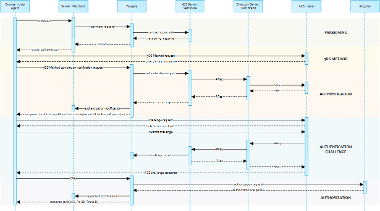
Please note that the the communication between client and Access Control Server (ACS) is implemented through iframes. Thus, responses arrive in an HTML subdocument and you may establish correspondent event listeners in your root document.
Alternatively you could solely rely on asynchronous notifications delivered to your backend. In those cases you may have to consider methods such as long polling, SSE or websockets to update the client.
Payment Initiation
The initial request to Computop Paygate will be the same regardless of the underlying 3-D Secure Protocol.
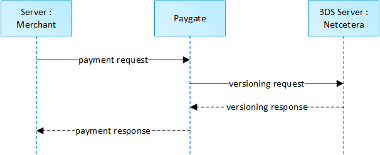
In order to start Google Pay™ 3-D Secure payment sequence please post the following key-value-pairs to https://www.computop-paygate.com/googlepay.aspx.
Call of interface: general parameters
To carry out a Google Pay payment via a Server-to-Server connection, please use the following URL:
https://www.computop-paygate.com/googlepay.aspx
Request Elements
Notice: For security reasons, Computop Paygate rejects all payment requests with formatting errors. Therefore, please use the correct data type for each parameter.
The following table describes the encrypted payment request parameters:
| Key | REST | Format | CND | Description | ||||||||
|---|---|---|---|---|---|---|---|---|---|---|---|---|
ans..30 | M | MerchantID, assigned by Computop. Additionally this parameter has to be passed in plain language too. | ||||||||||
––– | ans..5 | M | Computop Paygate Message version. Valid values:
| |||||||||
ans..64 | M | TransactionID provided by you which should be unique for each payment | ||||||||||
ans..32 | O | To avoid double payments or actions (e.g. by ETM), enter an alphanumeric value which identifies your transaction and may be assigned only once. If the transaction or action is submitted again with the same ReqID, Computop Paygate will not carry out the payment or new action, but will just return the status of the original transaction or action. Please note that the Computop Paygate must have a finalized transaction status for the first initial action (authentication/authorisation). This does not apply to 3-D Secure authentications that are terminated by a timeout. The 3-D Secure Timeout status does not count as a completed status in which the ReqID functionality on Paygate does not take effect. Submissions with identical ReqID for an open status will be processed regularly. Notice: Please note that a ReqID is only valid for 12 month, then it gets deleted at the Paygate. | ||||||||||
RefNr | O | Merchant’s unique reference number, which serves as payout reference in the acquirer EPA file. Please note, without the own shop reference delivery you cannot read out the EPA transaction and regarding the additional Computop settlement file (CTSF) we cannot add the additional payment data. Details on supported format can be found below in payment specific section. Only ASCII characters allowed, special characters ("Umlaute", diacritics) are not allowed and must be replaced by their ASCII-representation (e.g. ü → ue, é → e, ...). | ||||||||||
n..10 | M | Amount in the smallest currency unit (e.g. EUR Cent). Please contact the Computop Helpdesk, if you want to capture amounts <100 (smallest currency unit). | ||||||||||
a3 | M | Currency, three digits DIN / ISO 4217, e.g. EUR, USD, GBP. Please find an overview here: A1 Currency table | ||||||||||
an..6 | OM | Determines the type and time of capture.
| ||||||||||
OrderDesc | ans..768 | O | Order description | |||||||||
JSON | M | Accurate browser information are needed to deliver an optimized user experience. Required for 3-D Secure 2.0 transactions. | ||||||||||
JSON | C | The customer that is getting billed for the goods and / or services. Required unless market or regional mandate restricts sending this information. | ||||||||||
ans..256 | C | Complete URL which Paygate calls up in order to notify the shop about the payment result. The URL may be called up only via port 443. It may not contain parameters: Use the UserDataparameter instead. In case of a merchant initiated recurring transaction the JSON objects (besides credentialOnFile and card), the URLNotify and TermURL are not mandatory parameters, because no 3-D Secure and no risk evaluation is done by the card issuing bank and the payment result is directly returned within the response. Common notes:
| ||||||||||
––– | an64 | M | Hash Message Authentication Code (HMAC) with SHA-256 algorithm. Details can be found here: | |||||||||
TokenExt | ans..1024 | M | Google Pay Token as JSON string in the Base64 format | |||||||||
Channel | a..10 | C | Channel over which the order is processed. Allowed values are WEBSITE and MOBILE_APP. The channel parameter is mandatory for RedSys. Please provide it if your processor is RedSys. For other processors, it is not obligatory to provide this information. |
General parameters for credit card payments via socket connection
Please note the additional parameter for a specific credit card integration in the section "Specific parameters"
Response Elements (authentication)
The following table describes the result parameters with which the Computop Paygate responds to your system
pls. be prepared to receive additional parameters at any time and do not check the order of parameters
the key (e.g. MerchantId, RefNr) should not be checked case-sentive
| Key | Format | CND | Description |
|---|---|---|---|
ans..30 | M | MerchantID, assigned by Computop | |
an32 | M | ID assigned by Paygate for the payment, e.g. for referencing in batch files as well as for capture or credit request. | |
an32 | M | ID for all single transactions (authorisation, capture, credit note) for one payment assigned by Paygate | |
ans..64 | M | TransactionID provided by you which should be unique for each payment | |
RefNr | O | Reference number as given in request | |
Status | a..20 | M | Status of the transaction. Values accepted:
|
ans..1024 | M | Further details in the event that payment is rejected. Please do not use the Description but the Code parameter for the transaction status analysis! | |
an8 | M | Error code according to Paygate Response Codes (A4 Error codes) | |
ans..1024 | O | If specified at request, Paygate forwards the parameter with the payment result to the shop. | |
JSON | M | Card data | |
JSON | M | The Card Range Data data element contains information that indicates the most recent EMV 3-D Secure version supported by the ACS that hosts that card range. It also may optionally contain the ACS URL for the 3-D Secure Method if supported by the ACS and the DS Start and End Protocol Versions which support the card range. | |
JSON | C | Object containing the data elements required to construct the Payer Authentication request in case of a fallback to 3-D Secure 1.0. |
versioningData
The versioningData object will indicate the EMV 3-D Secure protocol versions (i.e. 2.1.0 or higher) that are supported by Access Control Server of the issuer.
If the corresponding protocol version fields are NULL it means that the BIN range of card issuer is not registered for 3-D Secure 2.0 and a fallback to 3-D Secure 1.0 is required for transactions that are within the scope of PSD2 SCA.
When parsing versioningData please also refer to the subelement errorDetails which will specify the reason if some fields are not pupoluated (e.g. Invalid cardholder account number passed, not available card range data, failure in encoding/serialization of the 3-D Secure Method data etc)
BASEURL= https://www.computop-paygate.com/.
1{2 "threeDSServerTransID": "14dd844c-b0fc-4dfe-8635-366fbf43468c",3 "acsStartProtocolVersion": "2.1.0",4 "acsEndProtocolVersion": "2.1.0",5 "dsStartProtocolVersion": "2.1.0",6 "dsEndProtocolVersion": "2.1.0",7 "threeDSMethodURL": "http://www.acs.com/script",8 "threeDSMethodDataForm": "eyJ0aHJlZURTTWV0aG9kTm90aWZpY2F0aW9uVVJMIjoiaHR0cHM6Ly93d3cuY29tcHV0b3AtcGF5Z2F0ZS5jb20vY2JUaHJlZURTLmFzcHg_YWN0aW9uPW10aGROdGZuIiwidGhyZWVEU1NlcnZlclRyYW5zSUQiOiIxNGRkODQ0Yy1iMGZjLTRkZmUtODYzNS0zNjZmYmY0MzQ2OGMifQ==",9 "threeDSMethodData": {10 "threeDSMethodNotificationURL": "BASEURL/cbThreeDS.aspx?action=mthdNtfn",11 "threeDSServerTransID": "14dd844c-b0fc-4dfe-8635-366fbf43468c"12 }13}3-D Secure Method
The 3-D Secure Method allows for additional browser information to be gathered by an ACS prior to receipt of the authentication request message (AReq) to help facilitate the transaction risk assessment. Support of 3-D Secure Method is optional and at the discretion of the issuer.
The versioningData object contains a value for threeDSMethodURL. The merchant is supposed to invoke the 3-D Secure Method via a hidden HTML iframe in the cardholder browser and send a form with a field named threeDSMethodData via HTTP POST to the ACS 3-D Secure Method URL.
3-D Secure Method: threeDSMethodURL
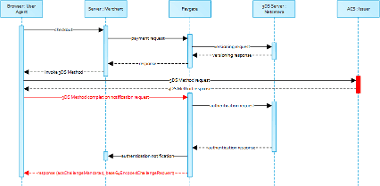
Please note that the threeDSMethodURL will be populated by Computop Paygate if the issuer does not support the 3-D Secure Method. The 3-D Secure Method Form Post as outlined below must be performed independently from whether it is supported by the issuer. This is necessary to facilitate direct communication between the browser and Computop Paygate in case of a mandated challenge or a frictionless flow.
3-D Secure Method: No issuer threeDSMethodURL
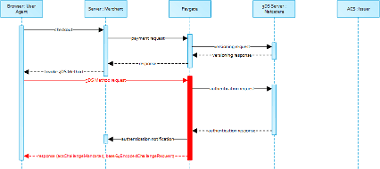
3-D Secure Method Form Post
1<form name="frm" method="POST" action="Rendering URL">2 <input type="hidden" name="threeDSMethodData" value="eyJ0aHJlZURTU2VydmVyVHJhbnNJRCI6IjNhYzdjYWE3LWFhNDItMjY2My03OTFiLTJhYzA1YTU0MmM0YSIsInRocmVlRFNNZXRob2ROb3RpZmljYXRpb25VUkwiOiJ0aHJlZURTTWV0aG9kTm90aWZpY2F0aW9uVVJMIn0">3</form>The ACS will interact with the Cardholder browser via the HTML iframe and then store the applicable values with the 3-D Secure Server Transaction ID for use when the subsequent authentication message is received containing the same 3-D Secure Server Transaction ID.
Netcetera 3DS Web SDK
You may use the operations init3DSMethod or createIframeAndInit3DSMethod at your discreation from the nca3DSWebSDK in order to iniatiate the 3-D Secure Method. Please refer to the Integration Manual at https://mpi.netcetera.com/3dsserver/doc/current/integration.html#Web_Service_API.
Once the 3-D Secure Method is concluded the ACS will instruct the cardholder browser through the iFrame response document to submit as a hidden form field to the 3-D Secure Method Notification URL.
ACS Response Document
1<!DOCTYPE html>2<html lang="en">3<head>4    <meta charset="UTF-8"/>5    <title>Identifying...</title>6</head>7<body>8<script>9    var tdsMethodNotificationValue = 'eyJ0aHJlZURTU2VydmVyVHJhbnNJRCI6ImUxYzFlYmViLTc0ZTgtNDNiMi1iMzg1LTJlNjdkMWFhY2ZhMiJ9';10
11    var form = document.createElement("form");12    form.setAttribute("method", "post");13    form.setAttribute("action", "notification URL");14
15    addParameter(form, "threeDSMethodData", tdsMethodNotificationValue);16
17    document.body.appendChild(form);18    form.submit();19
20 function addParameter(form, key, value) {21 var hiddenField = document.createElement("input");22 hiddenField.setAttribute("type", "hidden");23 hiddenField.setAttribute("name", key);24 hiddenField.setAttribute("value", value);25 form.appendChild(hiddenField);26 }27</script>28</body>29</html>3-D Secure Method Notification Form
1<form name="frm" method="POST" action="3DS Method Notification URL">2 <input type="hidden" name="threeDSMethodData" value="eyJ0aHJlZURTU2VydmVyVHJhbnNJRCI6ImUxYzFlYmViLTc0ZTgtNDNiMi1iMzg1LTJlNjdkMWFhY2ZhMiJ9">3</form>Please note that the threeDSMethodNotificationURL as embedded in the Base64 encoded threeDSMethodData value points to Computop Paygate and must not be modified. The merchant notification is delivered to the URLNotify as provided in the original request or as configured for the MerchantID in Computop Paygate.
Authentication
If 3-D Secure Method is supported by the issuer ACS and was invoked by the merchant Computop Paygate will automatically continue with the authentication request once the 3-D Secure Method has completed (i.e. 3-D Secure Method Notification).
The authentication result will be transferred via HTTP POST to the URLNotify. It may indicate that the Cardholder has been authenticated, or that further cardholder interaction (i.e. challenge) is required to complete the authentication.
In case a cardholder challenge is deemed necessaryComputop Paygate will transfer a JSON object within the body of HTTP browser response with the elements acsChallengeMandated, challengeRequest, base64EncodedChallengeRequest and acsURL. Otherwise, in a frictionless flow, Computop Paygate will automatically continue and respond to the cardholder browser once the authorization completed.
Cardholder Challenge: Browser Response
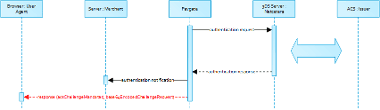
Browser Challenge Response
Data Elements
| Key | Format | CND | Description |
|---|---|---|---|
acsChallengeMandated | boolean | M | Indication of whether a challenge is required for the transaction to be authorised due to local/regional mandates or other variable:
|
object | M | Challenge request object | |
base64EncodedChallengeRequest | string | M | Base64-encoded Challenge Request object |
acsURL | string | M | Fully qualified URL of the ACS to be used to post the Challenge Request |
Schema: Browser Challenge Response
1{2 "$schema": "http://json-schema.org/draft-07/schema#",3 "type": "object",4 "properties": {5 "acsChallengeMandated": {"type": "boolean"},6 "challengeRequest": {"type": "object"},7 "base64EncodedChallengeRequest": {"type": "string"},8 "acsURL": {"type": "string"}9 },10 "required": ["acsChallengeMandated", "challengeRequest", "base64EncodedChallengeRequest", "acsURL"],11 "additionalProperties": false12}Sample: Browser Challenge Response
1{2 "acsChallengeMandated": false,3 "challengeRequest": {4 "threeDSServerTransID": "8a880dc0-d2d2-4067-bcb1-b08d1690b26e",5 "acsTransID": "d7c1ee99-9478-44a6-b1f2-391e29c6b340",6 "messageType": "CReq",7 "messageVersion": "2.1.0",8 "challengeWindowSize": "01",9 "messageExtension": [10 {11 "name": "emvcomsgextInChallenge",12 "id": "tc8Qtm465Ln1FX0nZprA",13 "criticalityIndicator": false,14 "data": "messageExtensionDataInChallenge"15 }16 ]17 },18 "base64EncodedChallengeRequest": "base64-encoded-challenge-request",19 "acsURL": "acsURL-to-post-challenge-request"20}Authentication Notification
The data elements of the authentication notification are listed in the table below.
| Key | Format | CND | Description |
|---|---|---|---|
ans..30 | M | MerchantID, assigned by Computop | |
an32 | M | ID assigned by Paygate for the payment, e.g. for referencing in batch files as well as for capture or credit request. | |
an32 | M | ID for all single transactions (authorisation, capture, credit note) for one payment assigned by Paygate | |
ans..64 | M | TransactionID provided by you which should be unique for each payment | |
an8 | M | Error code according to Paygate Response Codes (A4 Error codes) | |
an64 | M | Hash Message Authentication Code (HMAC) with SHA-256 algorithm. Details can be found here: | |
JSON | M | Response object in return of the authentication request with the ACS |
Browser Challenge
If a challenge is deemed necessary (see challengeRequest) the browser challenge will occur within the cardholder browser. To create a challenge it is required to post the value base64EncodedChallengeRequest via an HTML iframe to the ACS URL.
Challenge Request
1<form name="challengeRequestForm" method="post" action="acsChallengeURL">2 <input type="hidden" name="creq" value="ewogICAgInRocmVlRFNTZXJ2ZXJUcmFuc0lEIjogIjhhODgwZGMwLWQyZDItNDA2Ny1iY2IxLWIwOGQxNjkwYjI2ZSIsCiAgICAiYWNzVHJhbnNJRCI6ICJkN2MxZWU5OS05NDc4LTQ0YTYtYjFmMi0zOTFlMjljNmIzNDAiLAogICAgIm1lc3NhZ2VUeXBlIjogIkNSZXEiLAogICAgIm1lc3NhZ2VWZXJzaW9uIjogIjIuMS4wIiwKICAgICJjaGFsbGVuZ2VXaW5kb3dTaXplIjogIjAxIiwKICAgICJtZXNzYWdlRXh0ZW5zaW9uIjogWwoJCXsKCQkJIm5hbWUiOiAiZW12Y29tc2dleHRJbkNoYWxsZW5nZSIsCgkJCSJpZCI6ICJ0YzhRdG00NjVMbjFGWDBuWnByQSIsCgkJCSJjcml0aWNhbGl0eUluZGljYXRvciI6IGZhbHNlLAoJCQkiZGF0YSI6ICJtZXNzYWdlRXh0ZW5zaW9uRGF0YUluQ2hhbGxlbmdlIgoJCX0KICAgIF0KfQ==">3</form>You may use the operations init3DSChallengeRequest or createIFrameAndInit3DSChallengeRequest from the nca3DSWebSDK in order submit the challenge message through the cardholder browser.
Init 3-D Secure Challenge Request - Example
1<!DOCTYPE html>2<html lang="en">3<head>4 <meta charset="UTF-8">5 <script src="nca-3ds-web-sdk.js" type="text/javascript"></script>6 <title>Init 3-D Secure Challenge Request - Example</title>7</head>8<body>9<!-- This example will show how to initiate Challenge Reqeuests for different window sizes. -->10<div id="frameContainer01"></div>11<div id="frameContainer02"></div>12<div id="frameContainer03"></div>13<div id="frameContainer04"></div>14<div id="frameContainer05"></div>15<iframe id="iframeContainerFull" name="iframeContainerFull" width="100%" height="100%"></iframe>16 17<script type="text/javascript">18 // Load all containers19 iFrameContainerFull = document.getElementById('iframeContainerFull');20 container01 = document.getElementById('frameContainer01');21 container02 = document.getElementById('frameContainer02');22 container03 = document.getElementById('frameContainer03');23 container04 = document.getElementById('frameContainer04');24 container05 = document.getElementById('frameContainer05');25 26 27 // nca3DSWebSDK.init3DSChallengeRequest(acsUrl, creqData, container);28 nca3DSWebSDK.init3DSChallengeRequest('http://example.com', 'base64-encoded-challenge-request', iFrameContainerFull);29 30 // nca3DSWebSDK.createIFrameAndInit3DSChallengeRequest(acsUrl, creqData, challengeWindowSize, frameName, rootContainer, callbackWhenLoaded);31 nca3DSWebSDK.createIFrameAndInit3DSChallengeRequest('http://example.com', 'base64-encoded-challenge-request', '01', 'threeDSCReq01', container01);32 nca3DSWebSDK.createIFrameAndInit3DSChallengeRequest('http://example.com', 'base64-encoded-challenge-request', '02', 'threeDSCReq02', container02);33 nca3DSWebSDK.createIFrameAndInit3DSChallengeRequest('http://example.com', 'base64-encoded-challenge-request', '03', 'threeDSCReq03', container03);34 nca3DSWebSDK.createIFrameAndInit3DSChallengeRequest('http://example.com', 'base64-encoded-challenge-request', '04', 'threeDSCReq04', container04);35 nca3DSWebSDK.createIFrameAndInit3DSChallengeRequest('http://example.com', 'base64-encoded-challenge-request', '05', 'threeDSCReq05', container05, () => {36 console.log('Iframe loaded, form created and submitted');37 });38</script>39 40</body>41</html>Once the cardholder challenge is completed, was cancelled or timed out the ACS will instruct the browser to post the results to the notfication URL as specified in the challenge request and to send a Result Request (RReq) via the Directory Server to the 3-D Secure Server.
Please note that the notification URL submited in the challenge request points to Computop Paygate and must not be changed.
Authorization
After successful cardholder authentication or proof of attempted authentication/verification is provided Computop Paygate will automatically continue with the payment authorization.
In case the cardholder authentication was not successful or proof of attempted authentication/verification can not be provided Computop Paygate will not continue with an authorization request.
In both cases Paygate will deliver a notification with the authentication result to the merchant specified with the data elements as listed in the table below.
Payment Notification
In case of using Key-Value-Pair API
The following table gives the result parameters which Computop Paygate transmits to URLSuccess or URLFailure and URLNotify. If you have specified the Response=encrypt parameter, the following parameters are sent Blowfish encrypted to your system:
pls. be prepared to receive additional parameters at any time and do not check the order of parameters
the key (e.g. MerchantId, RefNr) should not be checked case-sentive
| Key | Format | CND | Description | ||||
|---|---|---|---|---|---|---|---|
ans..30 | M | MerchantID, assigned by Computop | |||||
ans..5 | M | Computop Paygate Message version. Valid values:
| |||||
an32 | M | ID assigned by Paygate for the payment, e.g. for referencing in batch files as well as for capture or credit request. | |||||
an32 | M | ID for all single transactions (authorisation, capture, credit note) for one payment assigned by Paygate | |||||
ans..64 | M | TransactionID provided by you which should be unique for each payment | |||||
ans..64 | C | Card scheme specific transaction ID required for subsequent credential-on-file payments, delayed authorizations and resubmissions. Mandatory: CredentialOnFile – initial false – unscheduled MIT / recurring schemeReferenceID is returned for 3DS2-payments. In case of fallback to 3DS1 you will also need to check for TransactionId. The schemeReferenceID is a unique identifier generated by the card brands and as a rule Computop merchants can continue to use the SchemeReferenceIDs for subscription plans that were created while using another PSP environment / Paygate MerchantID / Acquirer ContractID / Acquirer. | |||||
TrxTime | an21 | M | Transaction time stamp in format DD.MM.YYYY HH:mm:ssff | ||||
Status | a..20 | M | Status of the transaction. Values accepted:
In case of Authentication-only the Status will be either OK or FAILED. | ||||
ans..1024 | M | Further details in the event that payment is rejected. Please do not use the Description but the Code parameter for the transaction status analysis! | |||||
an8 | M | Error code according to Paygate Response Codes (A4 Error codes) | |||||
an64 | M | Hash Message Authentication Code (HMAC) with SHA-256 algorithm. Details can be found here: | |||||
JSON | M | Card data | |||||
JSON | O | Object containing IP information | |||||
JSON | M | Authentication data | |||||
JSON | C | In case the authentication process included a cardholder challenge additional information about the challenge result will be provided. | |||||
JSON | O | Optional additional data from acquirer/issuer/3rd party for authorization. | |||||
n16 | O | Pseudo Card Number: Random number generated by Computop Paygate which represents a genuine credit card number. The pseudo card number (PCN) starts with 0 and the last 3 digits correspond to those of the real card number. The PCN can be used like a genuine card number for authorisation, capture and credits. PCNr is a response value from Computop Paygate and is sent as CCNr in Request or part of card-JSON |
Browser Payment Response
Additionally the JSON formatted data elements as listed below are transferred in the HTTP response body to the cardholder browser. Please note that the data elements (i.e. MID, Len, Data) are base64 encoded.
Data Elements
| Key | Format | CND | Description |
|---|---|---|---|
ans..30 | M | MerchantID, assigned by Computop | |
Len | integer | M | Length of the unencrypted Data string |
Data | string | M | Blowfish encrypted string containing a JSON object with MID, PayID and TransID |
Schema
1{2 "$schema": "http://json-schema.org/draft-07/schema#",3 "type": "object",4 "properties": {5 "MID": {6 "type": "string"7 },8 "Len": {9 "type": "integer"10 },11 "Data": {12 "type": "string"13 }14 },15 "required": ["MID", "Len", "Data"],16 "additionalProperties": false17}Merchants are supposed to forward these data elements to their server for decryption and mapping agianst the payment notification. Based on the payment results the merchant server may deliver an appropriate response to the cardholder browser (e.g. success page).
Decrypted Data
| Key | Format | CND | Description |
|---|---|---|---|
ans..30 | M | MerchantID, assigned by Computop | |
an32 | M | ID assigned by Paygate for the payment, e.g. for referencing in batch files as well as for capture or credit request. | |
ans..64 | M | TransactionID provided by you which should be unique for each payment |
Sample decrypted Data
1MID=YourMID&PayID=PayIDassignedbyPlatform&TransID=YourTransID