About Click to Pay
General information about Click to Pay
VISA Click To Pay is an implementation of the next generation of remote commerce specification – Secure Remote Commerce (SRC), introduced by EMVCo in 2019 and designed to create an ecommerce checkout experience that delivers the same security, convenience and control as offered in the physical world. Consumers can checkout quickly and securely when they see the Click to Pay icon. Currently SRC is adopted by VISA, MC, AMEX and Discover under the umbrella product "Click To Pay".
Notice: Currently only VISA and Mastercard brand is supported.
Logo |
|
Info | Click to Pay is the online checkout experience built on the latest ecommerce industry specifications – EMV Secure Remote Commerce. To make a purchase, no longer entering of 16-digit primary account numbers, look up passwords or fill out long forms are required. To enjoy this easy, smart and secure online checkout experience simply click to pay with Visa or Mastercard when you see the Click to Pay icon
|
Type |


Further information you will find also on the webpage of Visa (https://www.visa.de/unser-partner-werden/bezahltechnologie/clicktopay-en.html).
Process flow chart

Click to Pay elements are hosted on Computop's credit card form and available out of the box for the merchants who use standard credit card form template (ct_responsive).
Please contact Computop Helpdesk to enable Click to Pay for your MID.
In case you're using custom credit card form template, please follow these samples how to enable Click to Pay elements for your template: Click to Pay for custom templates
There is an option to display a pop-up window with each call, in which buyers can enter their email address for Click To Pay in order to login faster. Please contact our helpdesk to enable this feature.
Template: ct_responsive

Template: ct_cards_v2
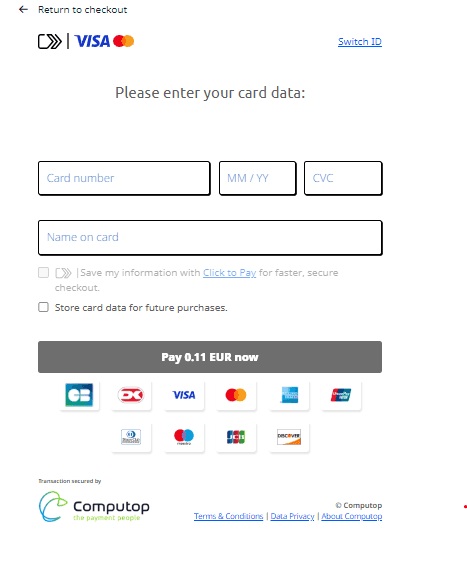
Paygate interface
Definitions
Data formats
Format | Description |
a | alphabetical |
as | alphabetical with special characters |
n | numeric |
an | alphanumeric |
ans | alphanumeric with special characters |
ns | numeric with special characters |
bool | boolean expression (true or false) |
3 | fixed length with 3 digits/characters |
..3 | variable length with maximum 3 digits/characters |
enum | enumeration of allowed values |
dttm | ISODateTime (YYYY-MM-DDThh:mm:ss) |
Abbreviations
Abbreviation | Description | Comment |
CND | condition | |
M | mandatory | If a parameter is mandatory, then it must be present |
O | optional | If a parameter is optional, then it can be present, but it is not required |
C | conditional | If a parameter is conditional, then there is a conditional rule which specifies whether it is mandatory or optional |
Notice: Please note that the names of parameters can be returned in upper or lower case.
Calling the interface
Click to Pay option is available on Computop's credit card form (payssl.aspx) and hosted payment page (paymentPage.aspx). Therefore no separate endpoint is required to call, Click to Pay is reachable within standard Credit card - interface via form.
When card holder decides to use Click to Pay, two transactions are created: in the Click to Pay transaction the required credit card data are obtained first and the actual credit card transaction is then carried out automatically. This takes place via a server-to-server connection and supports all usual credit card transaction options.
The table describes just recommended parameters for Click to Pay processing. It is also possible to include all credit card payment parameters (without credit card data). More information about this you can find within Card processing.
Key | Format | CND | Description |
ans..64 | O | Email address of the customer. If provided, Computop Paygate will determine if card holder's Click to Pay profile exists and simplify checkout experience. Alternatively Email can be provided as a part of customerInfo object. In this case no need to provide it separately. |
Capture / Credit / Reversal
Captures, credits and reversals do not refer to the Click to Pay transaction but directly to the credit card transaction. More information about this you can find within Card processing.
Batch processing via the interface
Captures, credits and reversals via batch do not refer to the Click to Pay transaction but directly to the credit card transaction. More information about this you can find within the document Card processing.
Click to Pay for custom templates
1<html>2 <head>3 <!-- Viewport -->4 <meta name="viewport" content="width=device-width, initial-scale=1.0" />5
6 <!-- Title -->7 <title>Click to Pay - Example code for XSL file</title>8 9 <!-- Embed CSS stylesheet for Click to Pay widgets -->10 <link rel="stylesheet" type="text/css" href="css/bootstrap-v5.3.2.min.css"></link>11 <link rel="stylesheet" type="text/css" href="css/clicktopay-v3-react.css" />12 <link rel="stylesheet" type="text/css" href="css/bootstrap-select.css"></link>13 <link rel="stylesheet" type="text/css" href="css/all.min.css"></link>14 15 <!-- Embed bootstrap and jQuery library (You can download and store the latest jquery library in your own template images folder as well) -->16 <script type="text/javascript" src="https://ajax.googleapis.com/ajax/libs/jquery/3.5.1/jquery.min.js"></script>17 <script type="text/javascript" src="js/bootstrap.bundle-v5.3.2.min.js"></script>18 <script type="text/javascript" src="js/bootstrap-select.min.js"></script>19 <script type="text/javascript" src="js/bootbox-v6.min.js"></script>20 21 </head>22 <body>23
24 <!-- Click to Pay "Switch ID" and "Access your saved Click to Pay cards" link. Depending on whether the customer was recognized or not -->25 <!-- We recommend to place it above the credit card input fields -->26 <xsl:if test="paygate/useClickToPay = 'true'">27 <div class="d-flex justify-content-between align-items-center ctp-access">28 <div class="d-flex align-items-center">29 <img class="ctp-logo" src="https://src.mastercard.com/assets/img/acc/global/src_standalone_mark_vert_blk.svg"/>30 <div class="ctp-divider"/>31 <div class="ctp-brands-logo">32 <img class="ctp-brand-visa-logo" src="images/brands/visa.svg"/>33 <img class="ctp-brand-mastercard-logo" src="images/brands/mastercard.svg"/>34 </div>35 </div>36 <div class="d-flex align-items-center">37 <div id="ctpEmail1" class="hidden"/>38 <div id="ctpDivider" class="ctp-divider hidden"/>39 <div id="ctpSwitchIdLink" class="blue-link"></div>40 </div>41 </div>42 <div id="ctpCardslink" class="d-flex justify-content-end black-link hidden"><xsl:value-of select="paygate/language/ClickToPay/accessSavedCards"/></div>43 <div class="d-flex justify-content-center align-items-center text-align-center ctp-info">44 <div id="ctpRequestInfo" class="font-size-12">45 <div class="padding-2 margin-top-15"><xsl:value-of select="paygate/language/ClickToPay/requestInfo1"/></div>46 <div class="padding-2"><xsl:value-of select="paygate/language/ClickToPay/requestInfo2"/></div>47 <div>48 <img src="images/loader_card_fetch_small_black.gif"></img>49 </div>50 </div>51 <div id="ctpResponseInfo" class="hidden font-size-12"></div>52 </div>53 </xsl:if>54 55 <!-- Click to Pay enrollment checkbox for unrecognized or new user flow -->56 <!-- We recommend to place it below the credit card input fields -->57 <div class="row ctp-checkbox disabled">58 <xsl:if test="paygate/challengeRequestIndicator = 'true'">59 <xsl:attribute name="style">60 margin-bottom: 5px !important;61 </xsl:attribute>62 </xsl:if>63 <input type="checkbox" id="ClickToPayEnrollment" name="ClickToPayEnrollment" disabled=""></input>64 <label for="ClickToPayEnrollment">65 <xsl:value-of select="paygate/language/ClickToPay/enrollmentCheckbox1"/><img class="margin-left-2 margin-right-2" src="images/ctp_logo.png"></img><xsl:value-of select="paygate/language/ClickToPay/enrollmentCheckbox2"/>66 </label>67 <span class="glyphicon glyphicon-info-sign" aria-hidden="true" data-bs-container="body" data-bs-toggle="popover" tabindex="0"></span>68 <p class="ctp-mc-agreement"><xsl:value-of select="paygate/language/ClickToPay/mcAgreementInfo"/></p>69 </div>70 71 <!-- Click to Pay hidden fields, which will contain all necessary data for Click to Pay API calls (Computop sets and handles these values dynamically on server side) -->72 <!-- IMPORTANT! Do not change any of these hidden fields names or values -->73 <xsl:if test="paygate/useClickToPay = 'true'">74 75 <input type="hidden" name="ClickToPayTestaccount"><xsl:attribute name="value"><xsl:value-of select="paygate/testClickToPay"/></xsl:attribute></input>76 <input type="hidden" name="ClickToPayActiveEnrollment"><xsl:attribute name="value"><xsl:value-of select="paygate/preselectClickToPayEnrollment"/></xsl:attribute></input>77 <input type="hidden" name="ClickToPayDtAutoStart"><xsl:attribute name="value"><xsl:value-of select="paygate/startDigitalTerminalAutomatically"/></xsl:attribute></input>78 <input type="hidden" name="ClickToPaySrciTransactionId"><xsl:attribute name="value"><xsl:value-of select="paygate/clickToPaySrciTransactionId"/></xsl:attribute></input>79 <input type="hidden" name="ClickToPayMasterCardSrciTransactionId"><xsl:attribute name="value"><xsl:value-of select="paygate/clickToPayMasterCardSrciTransactionId"/></xsl:attribute></input>80 <input type="hidden" name="ClickToPayAmexSrciTransactionId"><xsl:attribute name="value"><xsl:value-of select="paygate/clickToPayAmexSrciTransactionId"/></xsl:attribute></input>81 <input type="hidden" name="ClickToPaySrciDpaId"><xsl:attribute name="value"><xsl:value-of select="paygate/clickToPaySrciDpaId"/></xsl:attribute></input>82 <input type="hidden" name="ClickToPayMasterCardSrciDpaId"><xsl:attribute name="value"><xsl:value-of select="paygate/clickToPayMasterCardSrciDpaId"/></xsl:attribute></input>83 <input type="hidden" name="ClickToPayAmexSrciDpaId"><xsl:attribute name="value"><xsl:value-of select="paygate/clickToPayAmexSrciDpaId"/></xsl:attribute></input>84 <input type="hidden" name="ClickToPaySrcInitiatorId"><xsl:attribute name="value"><xsl:value-of select="paygate/clickToPaySrcInitiatorId"/></xsl:attribute></input>85 <input type="hidden" name="ClickToPayMasterCardSrcInitiatorId"><xsl:attribute name="value"><xsl:value-of select="paygate/clickToPayMasterCardSrcInitiatorId"/></xsl:attribute></input>86 <input type="hidden" name="ClickToPayAmexSrcInitiatorId"><xsl:attribute name="value"><xsl:value-of select="paygate/clickToPayAmexSrcInitiatorId"/></xsl:attribute></input>87 <input type="hidden" name="ClickToPayIdentityValue"><xsl:attribute name="value"><xsl:value-of select="paygate/clickToPayIdentityValue"/></xsl:attribute></input>88 <input type="hidden" name="ClickToPayDpaLocale"><xsl:attribute name="value"><xsl:value-of select="paygate/clickToPayDpaLocale"/></xsl:attribute></input>89 <input type="hidden" name="ClickToPayTransactionAmount"><xsl:attribute name="value"><xsl:value-of select="paygate/clickToPayTransactionAmount"/></xsl:attribute></input>90 <input type="hidden" name="ClickToPayTransactionCurrencyCode"><xsl:attribute name="value"><xsl:value-of select="paygate/clickToPayTransactionCurrencyCode"/></xsl:attribute></input>91 <input type="hidden" name="ClickToPayPostURL"><xsl:attribute name="value"><xsl:value-of select="paygate/clickToPayPostURL"/></xsl:attribute></input>92 <input type="hidden" name="ClickToPayOtpAttempts"></input>93
94 <input type="hidden" name="ClickToPayIdTokens"></input>95 <input type="hidden" name="ClickToPayIdToken"></input>96 <input type="hidden" name="ClickToPayCorrelationId"></input>97 <input type="hidden" name="ClickToPayDigitalCardId"></input>98 <input type="hidden" name="ClickToPayMaskedEmail"></input>99 <input type="hidden" name="ClickToPayMaskedNumber"></input>100
101 <input type="hidden" name="ClickToPayMasterCardIdTokens"></input>102 <input type="hidden" name="ClickToPayMasterCardIdToken"></input>103 <input type="hidden" name="ClickToPayMasterCardCorrelationId"></input>104 <input type="hidden" name="ClickToPayMasterCardDigitalCardId"></input>105 <input type="hidden" name="ClickToPayMasterCardMaskedEmail"></input>106 <input type="hidden" name="ClickToPayMasterCardMaskedNumber"></input>107
108 <input type="hidden" name="ClickToPayAmexIdTokens"></input>109 <input type="hidden" name="ClickToPayAmexIdToken"></input>110 <input type="hidden" name="ClickToPayAmexCorrelationId"></input>111 <input type="hidden" name="ClickToPayAmexDigitalCardId"></input>112 <input type="hidden" name="ClickToPayAmexMaskedEmail"></input>113 <input type="hidden" name="ClickToPayAmexMaskedNumber"></input>114 115 <!-- Embed all needed Click to Pay styles and scripts (Please do not change any of these source paths!!!) -->116 <link rel="stylesheet" type="text/css" href="css/modaldcfstyle.css" />117 <script data-main="scripts/main" src="js/jose.js"></script>118 119 <!-- VISA SDK -->120 <script type="text/javascript">121 <xsl:choose>122 <xsl:when test="paygate/testClickToPay = 'true'">123 <xsl:attribute name="src">https://sandbox.secure.checkout.visa.com/checkout-widget/resources/js/src-i-adapter/visaSdk.js</xsl:attribute>124 </xsl:when>125 <xsl:otherwise>126 <xsl:attribute name="src">https://assets.secure.checkout.visa.com/checkout-widget/resources/js/src-i-adapter/visaSdk.js</xsl:attribute>127 </xsl:otherwise>128 </xsl:choose>129 </script>130
131 <!-- MasterCard SDK -->132 <script type="text/javascript">133 <xsl:choose>134 <xsl:when test="paygate/testClickToPay = 'true'">135 <xsl:attribute name="src">https://sandbox.src.mastercard.com/sdk/srcsdk.mastercard.js</xsl:attribute>136 </xsl:when>137 <xsl:otherwise>138 <xsl:attribute name="src">https://src.mastercard.com/sdk/srcsdk.mastercard.js</xsl:attribute>139 </xsl:otherwise>140 </xsl:choose>141 </script>142
143 <!-- AMEX SDK -->144 <script type="text/javascript">145 <xsl:choose>146 <xsl:when test="paygate/testClickToPay = 'true'">147 <xsl:attribute name="src">https://qwww.aexp-static.com/akamai/remotecommerce/scripts/amexSDK-1.0.0.js</xsl:attribute>148 </xsl:when>149 <xsl:otherwise>150 <xsl:attribute name="src">https://www.aexp-static.com/akamai/remotecommerce/scripts/amexSDK-1.0.0.js</xsl:attribute>151 </xsl:otherwise>152 </xsl:choose>153 </script>154 155 <script type="text/javascript" src="js/bootbox-v6.min.js"></script>156 <script type="text/javascript" src="js/clicktopay-v2.1.js"></script>157 158 </xsl:if>159
160 </body>161</html>