About Computop Mobile SDK Authentication
General information about Computop Mobile SDK Authentication
This document describes the Computop SDK authentication method and the corresponding parameters for the request and the responses passed back. If a merchant develops an app of its own, this method is necessary so that secure authentication takes place via the Computop interface, independently of the app. The authentication is based on a one-off token that is exchanged between Computop and the merchant.
Further information about integration of the SDK can be found within GitHub repository at https://github.com/Computop.
Paymethods and integration
There you will find supported paymethods and details on integration.
There are currently two repositories existing:
Process flow chart
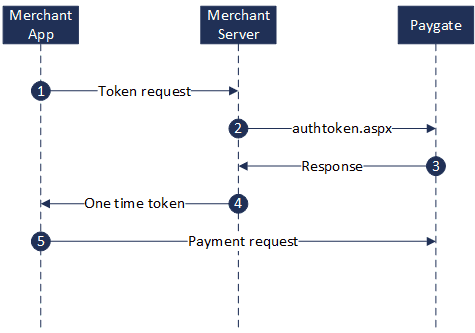
Process flow Mobile SDK Authentication
Paygate interface
Definitions
Data formats
Format | Description |
a | alphabetical |
as | alphabetical with special characters |
n | numeric |
an | alphanumeric |
ans | alphanumeric with special characters |
ns | numeric with special characters |
bool | boolean expression (true or false) |
3 | fixed length with 3 digits/characters |
..3 | variable length with maximum 3 digits/characters |
enum | enumeration of allowed values |
dttm | ISODateTime (YYYY-MM-DDThh:mm:ss) |
Abbreviations
Abbreviation | Description | Comment |
CND | condition | |
M | mandatory | If a parameter is mandatory, then it must be present |
O | optional | If a parameter is optional, then it can be present, but it is not required |
C | conditional | If a parameter is conditional, then there is a conditional rule which specifies whether it is mandatory or optional |
Notice: Please note that the names of parameters can be returned in upper or lower case.
Mobile SDK authentication process
High level process overview:
Mobile SDK creates authentication request to merchant’s URL endpoint
Merchant’s URL endpoint generates AuthToken and AuthLabel
Merchant’s URL endpoint calls Computop interface with below defined parameters
Merchant’s URL endpoint receives Computop response
Merchant’s URL endpoint responds to Mobile SDK authentication request
For the authentication request, the merchant’s endpoint should accept a POST request with Content-Type: application/json and a JSON body like this:
{
"merchantID" : <Computop_MerchantID>
}
The Mobile SDK expects a JSON object as response from merchant’s endpoint, so merchant’s endpoint needs to create a JSON object with attributes from the response and also the generated AuthToken and AuthLabel like this:
{
"AuthToken“: <generated_token>,
"AuthLabel": <generated_label>,
“ExpiryDate”: <expiry_date_of_token>
"Description": <description_from_Computop_response>,
"Status": <status_from_Computop_response>,
"Code": <code_from_Computop_response>
}
Calling the interface
In order to register a one-off token for encryption on Computop Paygate the merchant must transmit the following parameters to Computop via a server-to-server connection. Please use the following URL to do this:
https://www.computop-paygate.com/authtoken.aspx
Notice: For security reasons, Computop Paygate rejects all payment requests with formatting errors. Therefore, please use the correct data type for each parameter.
The following table describes the encrypted payment request parameters:
| Key | Format | CND | Description |
|---|---|---|---|
ans..30 | M | MerchantID, assigned by Computop. Additionally this parameter has to be passed in plain language too. | |
AuthToken | an16..56 | M | Unique token generated by merchant which is used to decrypt the payment request |
AuthLabel | an32..64 | M | Identifier for the AuthToken used to decrypt the payment request |
ExpiryDate | dttm | O | End time of token validity. The maximum period of validity amounts 24 hours. If the value is not specified the token expires after 15 minutes by default. |
Parameters for authentication request
The following table describes the result parameters with which the Computop Paygate responds to your system
pls. be prepared to receive additional parameters at any time and do not check the order of parameters
the key (e.g. MerchantId, RefNr) should not be checked case-sentive
| Key | Format | CND | Description |
|---|---|---|---|
ans..30 | M | MerchantID, assigned by Computop | |
a..50 | M | OK (URLSuccess) or FAILED (URLFailure) | |
ans..1024 | M | Further details in the event that payment is rejected. Please do not use the Description but the Code parameter for the transaction status analysis! | |
an8 | M | Error code according to Paygate Response Codes (A4 Error codes) | |
ExpiryDate | dttm | O | End time of token validity. The maximum period of validity amounts 24 hours. If the value is not specified the token expires after 15 minutes by default. |
Response parameters for authentication request