About Barzahlen
General information about Barzahlen
This manual describes configuring and using the Computop interface for Barzahlen:
Barzahlen is aimed at customers in Germany who do not want to enter sensitive data online, and those who do not use credit cards or online banking. An alternative to cash on delivery, Barzahlen is quicker and less expensive. Customers pay the amount to an associated retailer, on the basis of a payment form; the retailer transmits a payment confirmation in real time to the online shop so that the goods can be dispatched quickly.
Barzahlen is a payment provider for cash transactions. Customers use cash to pay for online purchases, travel bookings or diverse invoices. It is also possible to pay by cash to one’s own giro account.
The customer receives a barcode via email, SMS or Post to process the payment. This barcode is then scanned at the checkout of an individual partner branch and the customer pays with cash or another permitted payment method. The supplier is notified about payment in real time by the checkout system once the customer has paid. The payment service is carried out by Greensill Bank AG from Bremen.
Currently cash payments are made throughout Germany in over 10,000 branches of the REWE markets, dm-drogerie markets, PENNY markets, real,- supermarkets, Telekom Shops, mobilcom-debitel branches and with Budni chemists and in branches of the Dr. Eckert group.
Cash payments offer users who prefer cash, the option to buy, gamble or to book travel online without entering sensitive financial data. This cash option, means it is the only payment system available to every German without restriction. 68% of Germans over 18 years have no credit card (Deutsche Bundesbank 2015) and 51% do not use online banking (Bundesverband deutscher Banken 2014).
Logo |
|
Info | With Barzahlen online purchases in Germany at over 10,000 branches of retail partners such as real,- can be paid for in cash. The additional customer potential encompasses amongst other things those Internet users who do not yet purchase online. |
Type |
Further information can be found on the webpage of Barzahlen (https://www.barzahlen.de/de/).
Process flow chart

Barzahlen process flow
Configuration for Barzahlen
Merchants need to initially setup an account with Barzahlen on their webpage: https://controlcenter.barzahlen.de/#/account/signin
You start configuration once you have logged on.
In the cash payment Control Center you need to enter the following URLs under Settings / Divisions (https://controlcenter.barzahlen.de/#/settings/divisions).
Notification URL: https://www.computop-paygate.com/BarzahlenComplete.aspx
Sandbox notification URL: https://www.computop-paygate.com/BarzahlenComplete.aspx
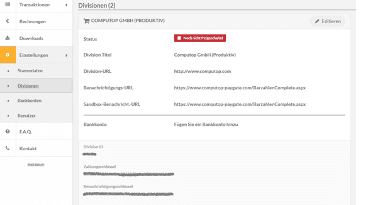
You must send the division-ID together with the payment key to the Computop Support at Computop Helpdesk, in order to activate this payment method within your MID on Paygate.
Paygate interface
Definitions
Data formats
Format | Description |
a | alphabetical |
as | alphabetical with special characters |
n | numeric |
an | alphanumeric |
ans | alphanumeric with special characters |
ns | numeric with special characters |
bool | boolean expression (true or false) |
3 | fixed length with 3 digits/characters |
..3 | variable length with maximum 3 digits/characters |
enum | enumeration of allowed values |
dttm | ISODateTime (YYYY-MM-DDThh:mm:ss) |
Abbreviations
Abbreviation | Description | Comment |
CND | condition | |
M | mandatory | If a parameter is mandatory, then it must be present |
O | optional | If a parameter is optional, then it can be present, but it is not required |
C | conditional | If a parameter is conditional, then there is a conditional rule which specifies whether it is mandatory or optional |
Notice: Please note that the names of parameters can be returned in upper or lower case.
Call of interface for Barzahlen
To carry out a Barzahlen payment via a Server-to-Server connection, please use the following URL:
https://www.computop-paygate.com/barzahlen.aspx
Notice: For security reasons, Computop Paygate rejects all payment requests with formatting errors. Therefore, please use the correct data type for each parameter.
The following table describes the encrypted payment request parameters:
| Key | Format | CND | Description |
|---|---|---|---|
ans..30 | M | MerchantID, assigned by Computop. Additionally this parameter has to be passed in plain language too. | |
ans..64 | M | TransactionID provided by you which should be unique for each payment | |
ans..30 | O | Merchant’s unique reference number | |
n..10 | M | Amount in the smallest currency unit (e.g. EUR Cent). Please contact the Computop Helpdesk, if you want to capture amounts <100 (smallest currency unit). | |
a3 | M | Currency, three digits DIN / ISO 4217, e.g. EUR, USD, GBP. Please find an overview here: A1 Currency table | |
an64 | M | Hash Message Authentication Code (HMAC) with SHA-256 algorithm. Details can be found here: | |
ans..256 | M | Complete URL which Paygate calls up in order to notify the shop about the payment result. The URL may be called up only via port 443. It may not contain parameters: Use the UserDataparameter instead. Common notes:
| |
ans..1024 | O | If specified at request, Paygate forwards the parameter with the payment result to the shop. | |
OrderDesc | ans..512 | M | Description of purchased goods, unit prices etc. The first 50 characters appear in the merchant’s settlement file. You can view the full data in the list within Computop Analytics. |
ans..32 | O | To avoid double payments or actions (e.g. by ETM), enter an alphanumeric value which identifies your transaction and may be assigned only once. If the transaction or action is submitted again with the same ReqID, Computop Paygate will not carry out the payment or new action, but will just return the status of the original transaction or action. Please note that the Computop Paygate must have a finalized transaction status for the first initial action (authentication/authorisation). This does not apply to 3-D Secure authentications that are terminated by a timeout. The 3-D Secure Timeout status does not count as a completed status in which the ReqID functionality on Paygate does not take effect. Submissions with identical ReqID for an open status will be processed regularly. Notice: Please note that a ReqID is only valid for 12 month, then it gets deleted at the Paygate. | |
CustomerID | ans..80 | C | Customer ID or customer number. If this value is not transmitted, the email address must be transmitted. |
ans..80 | C | Email address of the customer. If this value is not transmitted, the CustomerID must be transmitted. | |
Street | ans..60 | O | Customer's street and street number to find the nearest points of acceptance |
ZIP | ans..10 | O | Customer's post code to find the nearest points of acceptance |
City | ans..50 | O | Customer's city/town to find the nearest points of acceptance |
CountryCode | a2 | O | Country code according to ISO 3166. The default is DE. |
Language | a5 | O | 5-digit language code which impacts the language of the payment form and the response parameters. The default is de-DE. |
Expiration | n..4 | O | Validity of payment form in days. The default validity period of the payment form can also be provided within the Barzahlen backend. |
MobileNo | ans..50 | O | Customer's mobile phone number with country code. e.g. +49151123456789 |
ans..50 | O | A single value to be set by the merchant to return some information unencrypted in response/notify, e.g. the MID. "Plain"-parameter is part of encrypted "Data" in Computop Paygate and therefore protected against manipulation. | |
ans..1024 | O | "Custom"-parameter is added to the request data before encryption and is part of encrypted "Data" in Computop Paygate request. By this they are protected against manipulation by a consumer. The Custom-value is added to the Computop Paygate response in plain text and the "|" is replaced by a "&". By this you can put a single value into Custom-parameter and get multiple key-value-pairs back in response for your own purpose. Please find a sample here: Custom |
Parameters for payments with Barzahlen
The following table describes the result parameters with which the Computop Paygate responds to your system
pls. be prepared to receive additional parameters at any time and do not check the order of parameters
the key (e.g. MerchantId, RefNr) should not be checked case-sentive
| Key | Format | CND | Description |
|---|---|---|---|
ans..30 | M | MerchantID, assigned by Computop | |
an32 | M | ID assigned by Paygate for the payment, e.g. for referencing in batch files as well as for capture or credit request. | |
an32 | M | ID for all single transactions (authorisation, capture, credit note) for one payment assigned by Paygate | |
ans..64 | M | TransactionID provided by you which should be unique for each payment | |
ans..30 | O | Merchant’s unique reference number | |
Status | a..50 | M | AUTHORIZE_REQUEST or FAILED |
ans..1024 | M | Further details in the event that payment is rejected. Please do not use the Description but the Code parameter for the transaction status analysis! | |
an8 | M | Error code according to Paygate Response Codes (A4 Error codes) | |
CodeExt | n..10 | O | Detailed error code from Barzahlen. Notice: Is returned only if Status=FAILED. Use is possible only in agreement with Computop Helpdesk. |
ErrorText | ans..256 | O | Detailed error message from Barzahlen. Notice: Is returned only if Status=FAILED. Use is possible only in agreement with Computop Helpdesk. |
ans..1024 | O | If specified at request, Paygate forwards the parameter with the payment result to the shop. | |
TokenExt | ans..255 | M | Token to display the Barzahlen checkout page |
TransactionID | ans..50 | M | ID for identification of payment form |
ExpirationNotice | dttm | M | Expiration date of the payment form |
ans..50 | O | A single value to be set by the merchant to return some information unencrypted in response/notify, e.g. the MID. "Plain"-parameter is part of encrypted "Data" in Computop Paygate and therefore protected against manipulation. | |
ans..1024 | O | "Custom"-parameter is added to the request data before encryption and is part of encrypted "Data" in Computop Paygate request. By this they are protected against manipulation by a consumer. The Custom-value is added to the Computop Paygate response in plain text and the "|" is replaced by a "&". By this you can put a single value into Custom-parameter and get multiple key-value-pairs back in response for your own purpose. Please find a sample here: Custom |
Response parameters for payments with Barzahlen
The following table gives the results parameters which the Paygate transfers to your URLNotify:
| Key | Format | CND | Description |
|---|---|---|---|
ans..30 | M | MerchantID, assigned by Computop | |
an32 | M | ID assigned by Paygate for the payment, e.g. for referencing in batch files as well as for capture or credit request. | |
an32 | M | ID for all single transactions (authorisation, capture, credit note) for one payment assigned by Paygate | |
ans..64 | M | TransactionID provided by you which should be unique for each payment | |
ans..30 | O | Merchant’s unique reference number | |
a..50 | M | OK (URLSuccess) or FAILED (URLFailure) | |
ans..1024 | M | Further details in the event that payment is rejected. Please do not use the Description but the Code parameter for the transaction status analysis! | |
an8 | M | Error code according to Paygate Response Codes (A4 Error codes) | |
CodeExt | n..10 | O | Detailed error code from Barzahlen. Notice: Is returned only if Status=FAILED. Use is possible only in agreement with Computop Helpdesk. |
ErrorText | ans..256 | O | Detailed error message from Barzahlen. Notice: Is returned only if Status=FAILED. Use is possible only in agreement with Computop Helpdesk. |
ans..1024 | O | If specified at request, Paygate forwards the parameter with the payment result to the shop. | |
TransactionID | ans..50 | M | ID for identification of payment form |
ExpirationNotice | dttm | M | Expiration date of the payment form |
ans..50 | O | A single value to be set by the merchant to return some information unencrypted in response/notify, e.g. the MID. "Plain"-parameter is part of encrypted "Data" in Computop Paygate and therefore protected against manipulation. | |
ans..1024 | O | "Custom"-parameter is added to the request data before encryption and is part of encrypted "Data" in Computop Paygate request. By this they are protected against manipulation by a consumer. The Custom-value is added to the Computop Paygate response in plain text and the "|" is replaced by a "&". By this you can put a single value into Custom-parameter and get multiple key-value-pairs back in response for your own purpose. Please find a sample here: Custom |
Response parameters for URLNotify with Barzahlen
The merchant has to implement the following code on his page in order to display the Barzahlen checkout page.
1<!-- viacash Checkout -->2<script src="https://cdn.viafintech.com/js/v2/checkout.js"3 class="via-checkout"4 data-token="CHECKOUT_TOKEN">5</script>6<!-- End viacash Checkout -->The value of the Checkout_Token is transferred by Computop in the TokenExt parameter.
The src value must contain the following values for test and productive transactions:
Test: https://cdn.viafintech.com/js/v2/checkout-sandbox.js
Productive: https://cdn.viafintech.com/js/v2/checkout.js
Updating a payment
To update a Barzahlen payment via a Server-to-Server connection, please use the following URL:
https://www.computop-paygate.com/barzahlenUpdate.aspx
Notice: For security reasons, Computop Paygate rejects all payment requests with formatting errors. Therefore, please use the correct data type for each parameter.
The following table describes the encrypted payment request parameters:
| Key | Format | CND | Description |
|---|---|---|---|
ans..30 | M | MerchantID, assigned by Computop. Additionally this parameter has to be passed in plain language too. | |
an32 | M | ID assigned by Paygate for the payment, e.g. for referencing in batch files as well as for capture or credit request. | |
an64 | M | Hash Message Authentication Code (HMAC) with SHA-256 algorithm. Details can be found here: | |
Resending a payment form | |||
EventToken | a1 | M | R = Resend |
DistributionType | ans..5 | O | Delivery method of payment form for resending. Possible values: Email, Phone; default is Email. When resending a payment form for credits always an email is sent to the customer. |
Updating a payment form | |||
EventToken | a1 | M | U = Update |
Amount | n..10 | OC | Amount in the smallest currency unit (e.g. EUR Cent). Not for credits. |
MobileNo | ans..50 | OC | Customer’s new mobile telephone number. Not for credits. |
ans..255 | OC | New email address of the customer. Not for credits. | |
Expiration | n..4 | O | New validity of payment form in days. Updating the validity of a payment form. |
Parameters for updating a payment with Barzahlen
The following table describes the result parameters with which the Computop Paygate responds to your system
pls. be prepared to receive additional parameters at any time and do not check the order of parameters
the key (e.g. MerchantId, RefNr) should not be checked case-sentive
| Key | Format | CND | Description |
|---|---|---|---|
ans..30 | M | MerchantID, assigned by Computop | |
an32 | M | ID assigned by Paygate for the payment, e.g. for referencing in batch files as well as for capture or credit request. | |
an32 | M | ID for all single transactions (authorisation, capture, credit note) for one payment assigned by Paygate | |
ans..64 | M | TransactionID provided by you which should be unique for each payment | |
a..50 | M | OK (URLSuccess) or FAILED (URLFailure) | |
ans..1024 | M | Further details in the event that payment is rejected. Please do not use the Description but the Code parameter for the transaction status analysis! | |
an8 | M | Error code according to Paygate Response Codes (A4 Error codes) | |
CodeExt | n..10 | O | Detailed error code from Barzahlen. Notice: Is returned only if Status=FAILED. Use is possible only in agreement with Computop Helpdesk. |
ErrorText | ans..256 | O | Detailed error message from Barzahlen. Notice: Is returned only if Status=FAILED. Use is possible only in agreement with Computop Helpdesk. |
TransactionID | ans..50 | M | ID for identification of payment form |
ExpirationNotice | dttm | M | Expiration date of the payment form |
Response parameters for updating of Barzahlen
Credit with reference
Credits (refunds) are possible via a Server-to-Server connection. To carry out a credit with a reference transaction, please use the following URL:
https://www.computop-paygate.com/credit.aspx
Notice: For security reasons, Computop Paygate rejects all payment requests with formatting errors. Therefore, please use the correct data type for each parameter.
The following table describes the encrypted payment request parameters:
| Key | Format | CND | Description |
|---|---|---|---|
ans..30 | M | MerchantID, assigned by Computop. Additionally this parameter has to be passed in plain language too. | |
an32 | M | ID assigned by Paygate for the payment, e.g. for referencing in batch files as well as for capture or credit request. | |
ans..64 | M | TransactionID provided by you which should be unique for each payment | |
n..10 | M | Amount in the smallest currency unit (e.g. EUR Cent). Please contact the Computop Helpdesk, if you want to capture amounts <100 (smallest currency unit). | |
a3 | M | Currency, three digits DIN / ISO 4217, e.g. EUR, USD, GBP. Please find an overview here: A1 Currency table | |
an64 | M | Hash Message Authentication Code (HMAC) with SHA-256 algorithm. Details can be found here: | |
OrderDesc | ans..768 | O | Description of refunded goods, unit prices, merchant’s comment etc. |
ans..32 | O | To avoid double payments or actions (e.g. by ETM), enter an alphanumeric value which identifies your transaction and may be assigned only once. If the transaction or action is submitted again with the same ReqID, Computop Paygate will not carry out the payment or new action, but will just return the status of the original transaction or action. Please note that the Computop Paygate must have a finalized transaction status for the first initial action (authentication/authorisation). This does not apply to 3-D Secure authentications that are terminated by a timeout. The 3-D Secure Timeout status does not count as a completed status in which the ReqID functionality on Paygate does not take effect. Submissions with identical ReqID for an open status will be processed regularly. Notice: Please note that a ReqID is only valid for 12 month, then it gets deleted at the Paygate. |
Parameters for credits of Barzahlen payments
The following table describes the result parameters with which the Computop Paygate responds to your system
pls. be prepared to receive additional parameters at any time and do not check the order of parameters
the key (e.g. MerchantId, RefNr) should not be checked case-sentive
| Key | Format | CND | Description |
|---|---|---|---|
ans..30 | M | MerchantID, assigned by Computop | |
an32 | M | ID assigned by Paygate for the payment, e.g. for referencing in batch files as well as for capture or credit request. | |
an32 | M | ID for all single transactions (authorisation, capture, credit note) for one payment assigned by Paygate | |
ans..64 | M | TransactionID provided by you which should be unique for each payment | |
a..50 | M | OK (URLSuccess) or FAILED (URLFailure) | |
ans..1024 | M | Further details in the event that payment is rejected. Please do not use the Description but the Code parameter for the transaction status analysis! | |
an8 | M | Error code according to Paygate Response Codes (A4 Error codes) |
Result parameters for credits of Barzahlen payments
Reversal
In order to cancel a Barzahlen payment via a server-to-server communication, please use the following URL:
https://www.computop-paygate.com/reverse.aspx
Notice: Reverse.aspx does not only reverse authorisations, but any LAST TRANSACTION STAGE! If the last transaction was a capture, Reverse.aspx initiates the reverse, e.g. a credit. Therefore, the utmost caution is urged. Use is at your own risk. We recommend checking the transaction status with Inquire.aspx before using Reverse.aspx.
Notice: For security reasons, Computop Paygate rejects all payment requests with formatting errors. Therefore, please use the correct data type for each parameter.
The following table describes the encrypted payment request parameters:
| Key | Format | CND | Description |
|---|---|---|---|
ans..30 | M | MerchantID, assigned by Computop. Additionally this parameter has to be passed in plain language too. | |
an32 | M | ID assigned by Paygate for the payment, e.g. for referencing in batch files as well as for capture or credit request. | |
ans..64 | M | TransactionID provided by you which should be unique for each payment | |
n..10 | M | Amount in the smallest currency unit (e.g. EUR Cent). Please contact the Computop Helpdesk, if you want to capture amounts <100 (smallest currency unit). | |
a3 | M | Currency, three digits DIN / ISO 4217, e.g. EUR, USD, GBP. Please find an overview here: A1 Currency table | |
an64 | M | Hash Message Authentication Code (HMAC) with SHA-256 algorithm. Details can be found here: | |
ans..32 | O | To avoid double payments or actions (e.g. by ETM), enter an alphanumeric value which identifies your transaction and may be assigned only once. If the transaction or action is submitted again with the same ReqID, Computop Paygate will not carry out the payment or new action, but will just return the status of the original transaction or action. Please note that the Computop Paygate must have a finalized transaction status for the first initial action (authentication/authorisation). This does not apply to 3-D Secure authentications that are terminated by a timeout. The 3-D Secure Timeout status does not count as a completed status in which the ReqID functionality on Paygate does not take effect. Submissions with identical ReqID for an open status will be processed regularly. Notice: Please note that a ReqID is only valid for 12 month, then it gets deleted at the Paygate. |
Parameters for reversals of Barzahlen payments
The following table describes the result parameters with which the Computop Paygate responds to your system
pls. be prepared to receive additional parameters at any time and do not check the order of parameters
the key (e.g. MerchantId, RefNr) should not be checked case-sentive
| Key | Format | CND | Description |
|---|---|---|---|
ans..30 | M | MerchantID, assigned by Computop | |
an32 | M | ID assigned by Paygate for the payment, e.g. for referencing in batch files as well as for capture or credit request. | |
an32 | M | ID for all single transactions (authorisation, capture, credit note) for one payment assigned by Paygate | |
ans..64 | M | TransactionID provided by you which should be unique for each payment | |
a..50 | M | OK (URLSuccess) or FAILED (URLFailure) | |
ans..1024 | M | Further details in the event that payment is rejected. Please do not use the Description but the Code parameter for the transaction status analysis! | |
an8 | M | Error code according to Paygate Response Codes (A4 Error codes) |
Result parameters for reversals of Barzahlen payments
Batch processing via the interface
Basic information about using Batch files and about their structure can be found in the Batch Manager manual. Within batch processing not alle functions are available which are usually available for the online interface.
This section describes the parameters which must be transferred within the data set (Record) for executing reversals or credits with Barzahlen and which information can be found within the response file about the payment status.
For Batch calls there must be considered batch versions, from which optional parameters depend. All version designations starting with „2.“ pertain calls for a group of enterprises. That means within a batch file for a particular MerchantID can be transferred transactions for other merchants with a separate Sub-MID.
Following table gives an overview of all batch versions that are possible for a specific action and their specialities:
Action | Version | Description |
Credit | 1.0 / 2.0 | Standard version without return of parameter Code |
1.x / 2.x | with RefNr (valid for all versions other than 1.0) | |
Reverse | 1.0 / 2.0 | Standard version without return of parameter Code |
1.x / 2.x | with RefNr (valid for all versions other than 1.0) |
Description of the possible batch versions
The structure for a Barzahlen payment within a Batch file to be submitted is the following:
1HEAD,<MerchantID>,<Date>,<Version>2Barzahlen,Credit,<Amount>,<Currency>,<TransID>,(<RefNr>,)<PayID>3Barzahlen,Reverse,<Amount>,<Currency>,<TransID>,(<RefNr>,)<PayID>4FOOT,<CountRecords>,<SumAmount>Example for Master MID function:
1HEAD,[Master]MerchantID,Date,2.x2Type,Action,[Slave]MID,Amount,Currency,TransID,Data (depends on Action)3FOOT,CountRecords,SumAmountThe following table describes the individual fields and values used within the data set (record) in the batch file:
| Key | Format | CND | Description |
|---|---|---|---|
Type | a..11 | M | HEAD for Header, FOOT for Footer, Barzahlen for Barzahlen |
Action | a..20 | M | The parameter Action defines the type of transaction: Credit Reverse (cancellation) |
n..10 | M | Amount in the smallest currency unit (e.g. EUR Cent). Please contact the Computop Helpdesk, if you want to capture amounts <100 (smallest currency unit). | |
a3 | M | Currency, three digits DIN / ISO 4217, e.g. EUR, USD, GBP. Please find an overview here: A1 Currency table | |
ans..64 | M | TransactionID provided by you which should be unique for each payment | |
ans..30 | O | Merchant’s unique reference number | |
an32 | M | ID assigned by Paygate for this transaction |
Description of fields within the record for Batch files
The record area within the response file for Batch transactions looks the following way:
1HEAD,<MerchantID>,<Date>,<Version>2Barzahlen,Credit,<Amount>,<Currency>,<TransID>,(<RefNr>,)<PayID>,<Status>,<Code>3Barzahlen,Reverse,<Amount>,<Currency>,<TransID>,(<RefNr>,)<PayID>,<Status>,<Code>4FOOT,<CountRecords>,<SumAmount>The following table describes the response parameters which the Batch Manager saves in the Record area for each transaction (standard parameters not explained here, such as <TransID> or <RefNR> and request parameters are returned unchanged and correspond to the call as specified before):
| Key | Format | CND | Description |
|---|---|---|---|
Action | a..20 | M | The parameter Action defines the type of transaction: Credit Reverse (cancellation) |
an32 | M | ID assigned by Paygate for this transaction | |
a..50 | M | OK (URLSuccess) or FAILED (URLFailure) | |
an8 | M | Error code according to Paygate Response Codes (A4 Error codes) |
Description of result parameters within the record for Batch files