About PayU CEE GECAD
General information about payment methods via PayU CEE GECAD
For the PayU Connection there are two different variants of the interface depending on the countries as well as two manuals. This connection PayU CEE GECAD is valid for Hungary, Romania, Russia and Turkey. For Poland, Czech and Slovakia the connection PayU CEE Single has to be used. For that a separate manual exist: PayU CEE Single.
Logo |
|
Info | Integration of the PayU CEE GECAD platform is ideal for facilitating e-commerce in fast-growing eastern European countries, and covers the most popular payment methods now available in countries such as Hungary, Romania, Russia or Turkey. With an average internet usage rate of 60%, citizens of these countries provide an attractive market for expansion of international business. |
Type |

Process flow charts

PayU CEE GECAD process flow

Process flow PayU CEE GECAD via form interface payssl.aspx

Process flow PayU CEE GECAD via server-to-server interface direct.aspx
Configuration for PayU CEE GECAD
For configuring PayU CEE GECAD some settings are necessary in the PayU back end. Calling the back end is carried out by calling the respective URL for each country:
Romania: https://secure.payu.ro/cpanel/
Russian Federation: https://secure.payu.ru/cpanel/
Hungary: https://secure.payu.hu/cpanel/
Turkey: https://secure.payu.com.tr/cpanel/
Activate the tab Account settings at System settings. In the section of notifications IPN or Email Text & IPN must be selected. Additionally the options Canceled and returned orders and Complete orders must be activated.
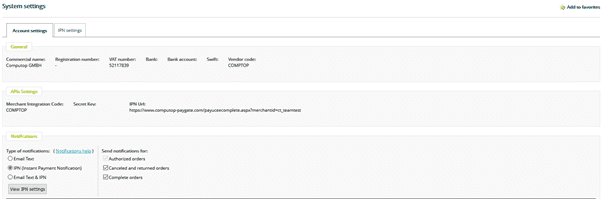
Now go to the tab IPN settings. Within the URL field enter the modified link in that form https://www.computop-paygate.com/payuceecomplete.aspx?merchantid=MID, but you must insert your own MID.

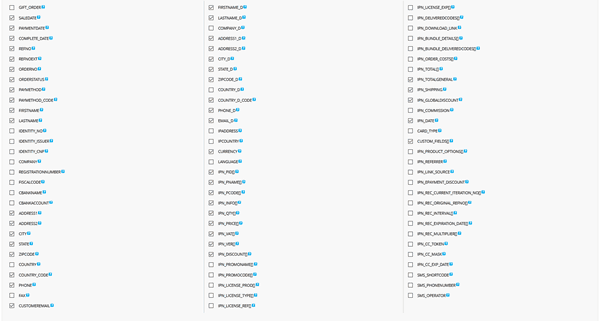
Furthermore the parameters REFNO, REFNOEXT, ORDERSTATUS, IPN_TOTALGENERAL and CURRENCY must be activated.
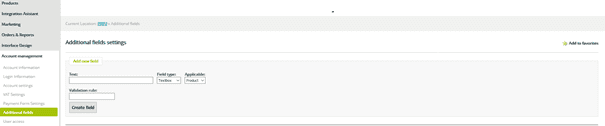
In the back end of PayU CEE GECAD additional parameters can be created. They will be displayed on the payment page and can/must be filled in by the customer.
If Customfields is selected within IPN Settings, Paygate will forward these parameters to the merchant.
Paygate interface
Definitions
Data formats
Format | Description |
a | alphabetical |
as | alphabetical with special characters |
n | numeric |
an | alphanumeric |
ans | alphanumeric with special characters |
ns | numeric with special characters |
bool | boolean expression (true or false) |
3 | fixed length with 3 digits/characters |
..3 | variable length with maximum 3 digits/characters |
enum | enumeration of allowed values |
dttm | ISODateTime (YYYY-MM-DDThh:mm:ss) |
Abbreviations
Abbreviation | Description | Comment |
CND | condition | |
M | mandatory | If a parameter is mandatory, then it must be present |
O | optional | If a parameter is optional, then it can be present, but it is not required |
C | conditional | If a parameter is conditional, then there is a conditional rule which specifies whether it is mandatory or optional |
Notice: Please note that the names of parameters can be returned in upper or lower case.
Payment with PayU CEE GECAD via form interface
To make a payment with PayU CEE GECAD, please use the following URL:
https://www.computop-paygate.com/payucee.aspx
Notice: For security reasons, Computop Paygate rejects all payment requests with formatting errors. Therefore, please use the correct data type for each parameter.
The following table describes the encrypted payment request parameters:
| Key | Format | CND | Description | ||||||||
|---|---|---|---|---|---|---|---|---|---|---|---|
ans..30 | M | MerchantID, assigned by Computop. Additionally this parameter has to be passed in plain language too. | |||||||||
ans..64 | M | TransactionID provided by you which should be unique for each payment | |||||||||
ans..30 | O | Merchant’s unique reference number | |||||||||
n..10 | M | Amount in the smallest currency unit (e.g. EUR Cent). Please contact the Computop Helpdesk, if you want to capture amounts <100 (smallest currency unit). | |||||||||
Currency | a3 | M | Currency, three digits DIN / ISO 4217, e.g. EUR. Presently only TRY, RON, EUR and USD permitted. Please find an overview here: A1 Currency table | ||||||||
an64 | M | Hash Message Authentication Code (HMAC) with SHA-256 algorithm. Details can be found here: | |||||||||
ans..256 | M | Complete URL which calls up Paygate if payment has been successful. The URL may be called up only via port 443. This URL may not contain parameters: In order to exchange values between Paygate and shop, please use the parameter UserData. Common notes:
| |||||||||
ans..256 | M | Complete URL which calls up Paygate if payment has been unsuccessful. The URL may be called up only via port 443. This URL may not contain parameters: In order to exchange values between Paygate and shop, please use the parameter UserData. Common notes:
| |||||||||
a7 | O | Status response sent by Paygate to URLSuccess and URLFailure, should be encrypted. For this purpose, transmit Response=encrypt parameter. | |||||||||
ans..256 | M | Complete URL which Paygate calls up in order to notify the shop about the payment result. The URL may be called up only via port 443. It may not contain parameters: Use the UserDataparameter instead. Common notes:
| |||||||||
ans..1024 | O | If specified at request, Paygate forwards the parameter with the payment result to the shop. | |||||||||
ans..32 | O | To avoid double payments or actions (e.g. by ETM), enter an alphanumeric value which identifies your transaction and may be assigned only once. If the transaction or action is submitted again with the same ReqID, Computop Paygate will not carry out the payment or new action, but will just return the status of the original transaction or action. Please note that the Computop Paygate must have a finalized transaction status for the first initial action (authentication/authorisation). This does not apply to 3-D Secure authentications that are terminated by a timeout. The 3-D Secure Timeout status does not count as a completed status in which the ReqID functionality on Paygate does not take effect. Submissions with identical ReqID for an open status will be processed regularly. Notice: Please note that a ReqID is only valid for 12 month, then it gets deleted at the Paygate. | |||||||||
an..6 | OM | Determines the type and time of capture.
| |||||||||
OrderDesc | ans..768 | M | Description of purchased goods, unit prices etc. | ||||||||
ArticleList(n) | ans..2048 | M | Customer’s article list in the form: Articlelist(n)= ArticleName,ArticleCode,UnitPrice,Quantity,VAT-rate,Type+ArticleName,ArticleCode,UnitPrice,Quantity,VAT-rate,Type+… Articlelist1 to max. Articlelist10 permissible The ArticleCode hast to be one-to-one because otherwise identical article numbers will be overwritten by PayU and not added. Thereby the total amount of trasaction could be changed by mistake. Example: Articlelist1=article1,123456,100,1,16,GROSS+article2,321654,200,2,16,NET Articlelist2=article3,987654,100,2,16,GROSS+article4,654231,150,1,16,NET The amount must be equal to the sum of the amounts in ArticleList, i.e. in the sample above: Amount=850 (1 x 100 + 2 x 200 + 2 x 100 + 1 x 150) | ||||||||
Discount | n..10 | O | Discount in the smallest currency unit | ||||||||
ChargeAmount | n..10 | O | Shipping costs. Amount in the smallest currency unit (e.g. EUR Cent) | ||||||||
AutoStart | bool | O | If you transfer the value 1 here you bypass the first page in the PayU-process. Important: This is possible only, if all necessary parameters are transferred. | ||||||||
Language | a2 | O | Language: RO – Romanian EN – English HU – Hungarian DE – German FR – French IT – Italian ES – Spanish BG – Bulgarian PL – Polish RU – Russian | ||||||||
PayType | ans..25 | M | Name of payment method to be executed Possible values for Romania: <Card> – VISA/MasterCard Installment payments: <BRDF> – BRDFinance Installment <STAR_BT> – Banca Transilvania’s StarBT <CARD_AVANTAJ> – Credit Europe’s CardAvantaj <ALPHABANK> – Alpha Bank Online bank transfers: <TRANSFER_ING> – Internet banking with ING Home Bank <ITRANSFER_BCR> – Internet banking with Click24 Banking BCR <ITRANSFER_BT> – Internet banking with BT24 Other: <ZEBRA> – cash deposit with ZebraPay Self Service <PAYPAL> – PayPal payments <WIRE> – Bank Wire Possible values for Turkey: <Card> – VISA/MasterCard Other: <WEBMONEY> <QIWI> <MAILRU> <YANDEX> (not valid for new customers) <EUROSET_SVYAZNOI> <ALFACLICK> <BKM> Value for merchants which have activated this method: <MASTERPASS> Note: If PayType is used, then parameter bdCountryCode becomes mandatory. | ||||||||
InstallmentData | ans..24 | OC | Only for Channel=RO: Preconfiguration of possible number of rates Default value is the configuration from the PayU system „2,3,4,5,6,7,8,9,10,11,12“ – All are displayed for choosing „2,3,7,10,12“ – 2,3,7,10,12 are displayed for choosing „2“– only 2 is displayed as an option „1„ – no installments possible | ||||||||
InstallmentNumber | n..2 | OC | Only for Channel=TR: Number of months of the payment by instalments (1-12) | ||||||||
Timeout | n..3 | O | Validity of transaction in seconds | ||||||||
Channel | a2 | O | Channel (country) of payment (the default channel will be configured by Computop Helpdesk): RO = Romania TR = Turkey RU = Russian Federation HU = Hungary UA = Ukraine | ||||||||
ans..50 | O | A single value to be set by the merchant to return some information unencrypted in response/notify, e.g. the MID. "Plain"-parameter is part of encrypted "Data" in Computop Paygate and therefore protected against manipulation. | |||||||||
ans..1024 | O | "Custom"-parameter is added to the request data before encryption and is part of encrypted "Data" in Computop Paygate request. By this they are protected against manipulation by a consumer. The Custom-value is added to the Computop Paygate response in plain text and the "|" is replaced by a "&". By this you can put a single value into Custom-parameter and get multiple key-value-pairs back in response for your own purpose. Please find a sample here: Custom | |||||||||
Billing address (PayU) | |||||||||||
bdFirstName | ans..128 | M | First name of the customer | ||||||||
bdLastName | ans..128 | M | Last name of the customer | ||||||||
bdStreet | ans..46 | O | Street name in the invoicing address | ||||||||
bdAddressAddition | ans..60 | O | Address addition in the billing address | ||||||||
bdCity | ans..40 | O | Name of town/city in the billing address | ||||||||
bdZip | ans..8 | O | Postcode in the invoicing address | ||||||||
bdState | ans..50 | O | Federal state in the invoicing address | ||||||||
bdCountryCode | a2 | OC | Country code in the invoicing address according to ISO 3166. Mandatory if PayType is submitted. | ||||||||
bdFax | ans..20 | O | Customer’s fax number | ||||||||
bdeMail | ans..128 | M | Email address of the customer | ||||||||
bdPhone | ans..40 | O | Customer’s phone number | ||||||||
IdCardSeries | ans..3 | O | Series of ID card | ||||||||
IdCardNumber | ans..20 | O | Serial number of ID card | ||||||||
IdCardIssuer | ans..128 | O | Issuer of ID card | ||||||||
NatIdentNr | ans..20 | O | CNP of the customer | ||||||||
CompanyName | ans..200 | O | Name of company | ||||||||
TaxNumber | ans..20 | O | VAT Reg. No. | ||||||||
RegisterNumber | ans..20 | O | Register of Companies number/commercial register | ||||||||
AccBank | ans..20 | O | Bank name of the company | ||||||||
AccNr | ans..20 | O | Account number of the company | ||||||||
Delivery address | |||||||||||
sdFirstName | ans..128 | O | First name in the delivery address | ||||||||
sdLastName | ans..128 | O | Surname in the delivery address | ||||||||
sdStreet | ans..46 | O | Street name in the delivery address | ||||||||
sdAddressAddition | ans..60 | O | Address addition in the delivery address | ||||||||
sdCity | ans..40 | O | Town/city in the delivery address | ||||||||
sdZip | ans..8 | O | Postcode in the delivery address | ||||||||
sdState | ans..50 | O | Federal state of the delivery address | ||||||||
sdCountryCode | a2 | O | Country code in the delivery address according to ISO 3166 | ||||||||
sdeMail | ans..128 | O | Email address in the delivery address | ||||||||
sdPhone | ans..40 | O | Phone number in the delivery address |
Parameters for payments with PayU CEE GECAD
The following table gives the result parameters which Computop Paygate transmits to URLSuccess or URLFailure and URLNotify. If you have specified the Response=encrypt parameter, the following parameters are sent Blowfish encrypted to your system:
pls. be prepared to receive additional parameters at any time and do not check the order of parameters
the key (e.g. MerchantId, RefNr) should not be checked case-sentive
| Key | Format | CND | Description |
|---|---|---|---|
ans..30 | M | MerchantID, assigned by Computop | |
an32 | M | ID assigned by Paygate for the payment, e.g. for referencing in batch files as well as for capture or credit request. | |
an32 | M | ID for all single transactions (authorisation, capture, credit note) for one payment assigned by Paygate | |
ans..64 | M | TransactionID provided by you which should be unique for each payment | |
ans..30 | O | Merchant’s unique reference number | |
Status | a..30 | M | OK, FAILED or AUTHORIZE_REQUEST. If 25 seconds after the redirect to CallBack page no notify is received from PayU, the status “AUTHORIZE_REQUEST”, Code “00000000” and Description ”REQUEST” is submitted to the URLSuccess. Please note, the status “AUTHORIZE_REQUEST” will be sent only to URLSuccess and there is no call of URLNotify. Should Computop Paygate receive a further final PayU status for this open payment, it will be sent separately via URLNotify. If you don't want to process a separate final status via URLNotify this open payment can be cancelled via calling reverse.aspx and should PayU nevertheless receive a revenue this will automatically be refunded to the customer. |
ans..1024 | M | Further details in the event that payment is rejected. Please do not use the Description but the Code parameter for the transaction status analysis! | |
an8 | M | Error code according to Paygate Response Codes (A4 Error codes) | |
an64 | M | Hash Message Authentication Code (HMAC) with SHA-256 algorithm. Details can be found here: | |
CodeExt | n..10 | O | Error code from PayU, if agreed with Computop Helpdesk |
ErrorText | ans..256 | O | Error text from PayU, if agreed with Computop Helpdesk |
ans..1024 | O | If specified at request, Paygate forwards the parameter with the payment result to the shop. | |
ans..50 | O | A single value to be set by the merchant to return some information unencrypted in response/notify, e.g. the MID. "Plain"-parameter is part of encrypted "Data" in Computop Paygate and therefore protected against manipulation. | |
ans..1024 | O | "Custom"-parameter is added to the request data before encryption and is part of encrypted "Data" in Computop Paygate request. By this they are protected against manipulation by a consumer. The Custom-value is added to the Computop Paygate response in plain text and the "|" is replaced by a "&". By this you can put a single value into Custom-parameter and get multiple key-value-pairs back in response for your own purpose. Please find a sample here: Custom |
Response parameters for URLSuccess and URLFailure with PayU CEE GECAD
The following table gives the results parameters which the Paygate transfers to URLNotify:
| Key | Format | CND | Description |
|---|---|---|---|
ans..30 | M | MerchantID, assigned by Computop | |
an32 | M | ID assigned by Paygate for the payment, e.g. for referencing in batch files as well as for capture or credit request. | |
an32 | M | ID for all single transactions (authorisation, capture, credit note) for one payment assigned by Paygate | |
ans..64 | M | TransactionID provided by you which should be unique for each payment | |
ans..30 | O | Merchant’s unique reference number | |
a..50 | M | OK (URLSuccess) or FAILED (URLFailure) | |
ans..1024 | M | Further details in the event that payment is rejected. Please do not use the Description but the Code parameter for the transaction status analysis! | |
an8 | M | Error code according to Paygate Response Codes (A4 Error codes) | |
an64 | M | Hash Message Authentication Code (HMAC) with SHA-256 algorithm. Details can be found here: | |
CodeExt | n..10 | O | Error code from PayU, if agreed with Computop Helpdesk |
ErrorText | ans..256 | O | Error text from PayU, if agreed with Computop Helpdesk |
ans..1024 | O | If specified at request, Paygate forwards the parameter with the payment result to the shop. | |
ans..50 | O | A single value to be set by the merchant to return some information unencrypted in response/notify, e.g. the MID. "Plain"-parameter is part of encrypted "Data" in Computop Paygate and therefore protected against manipulation. | |
ans..1024 | O | "Custom"-parameter is added to the request data before encryption and is part of encrypted "Data" in Computop Paygate request. By this they are protected against manipulation by a consumer. The Custom-value is added to the Computop Paygate response in plain text and the "|" is replaced by a "&". By this you can put a single value into Custom-parameter and get multiple key-value-pairs back in response for your own purpose. Please find a sample here: Custom | |
AmountAuth | n..10 | M | Actually authorized amount in the smallest currency unit |
Currency | a3 | M | Currency, three digits DIN / ISO 4217 |
TransactionID | ans..25 | O | RefNr from PayU system |
PayType | ans..25 | M | Name of used payment method (see above for possible values) |
bdFirstName | ans..128 | O | First name of the customer |
bdLastName | ans..128 | O | Last name of the customer |
bdStreet | ans..46 | O | Street name in the invoicing address |
bdAddressAddition | ans..60 | O | Address addition in the billing address |
bdCity | ans..40 | O | Name of town/city in the billing address |
bdZip | ans..8 | O | Postcode in the invoicing address |
bdState | ans..50 | O | Federal state in the invoicing address |
bdCountryCode | a2 | OC | Country code in the invoicing address according to ISO 3166. Mandatory if PayType is submitted. |
bdFax | ans..20 | O | Customer’s fax number |
bdeMail | ans..128 | M | Email address of the customer |
bdPhone | ans..40 | O | Customer’s phone number |
IdCardSeries | ans..3 | O | Series of ID card |
IdCardNumber | ans..20 | O | Serial number of ID card |
IdCardIssuer | ans..128 | O | Issuer of ID card |
NatIdentNr | ans..20 | O | CNP of the customer |
CompanyName | ans..200 | O | Name of company |
TaxNumber | ans..20 | O | VAT Reg. No. |
RegisterNumber | ans..20 | O | Register of Companies number/commercial register |
AccBank | ans..20 | O | Bank name of the company |
AccNr | ans..20 | O | Account number of the company |
sdFirstName | ans..128 | O | First name in the delivery address |
sdLastName | ans..128 | O | Surname in the delivery address |
sdStreet | ans..46 | O | Street name in the delivery address |
sdAddressAddition | ans..60 | O | Address addition in the delivery address |
sdCity | ans..40 | O | Town/city in the delivery address |
sdZip | ans..8 | O | Postcode in the delivery address |
sdState | ans..50 | O | Federal state of the delivery address |
sdCountryCode | a2 | O | Country code in the delivery address according to ISO 3166 |
sdeMail | ans..128 | O | Email address in the delivery address |
sdPhone | ans..40 | O | Phone number in the delivery address |
CustomParameter | ans.. | O | If additional parameters are configured in the PayU backend these are returned with the prefix “custom_”; e.g. PayU Parameter = age = custom_age |
InstallmentNumber | n..2 | O | Number of months of the payment by instalments (1-12), default=1 |
CardProgram | ans..25 | O | Name of the card programme which allows the instalment payment (see table of card programmes) |
Return parameters for URLNotify with PayU CEE GECAD
Following table gives an overview of supported card programmes for instalment payments. Please note that new programmes can be added and the participating banks can be changed.
Card programme | Issuer |
Advantage | T. İŞ BANKASI A.Ş. |
AsyaCard | ASYA KATILIM BANKASI A.Ş. |
Axess | AKBANK T.A.Ş. CITIBANK A.Ş. ODEA BANK A.Ş. |
Bonus | TÜRK EKONOMİ BANKASI A.Ş. ŞEKERBANK T.A.Ş. T.GARANTİ BANKASI A.Ş. ING BANK A.Ş. DENİZBANK A.Ş. TÜRKİYE FİNANS |
Cardfinans | FİNANS BANK A.Ş. |
Maximum | T.C.ZİRAAT BANKASI A.Ş. T. İŞ BANKASI A.Ş. |
Paraf | T.HALK BANKASI A.Ş. |
World | T.VAKIFLAR BANKASI T.A.O. YAPI VE KREDİ BANKASI A.Ş. ANADOLUBANK A.Ş. ALBARAKA TÜRK |
Supported card programmes for instalment payments
Credit card payment with PayU CEE GECAD via form interface
In order to process a SSL credit card payment with PayU CEE GECAD via a Paygate form, please use the following URL:
https://www.computop-paygate.com/payssl.aspx
Notice: For security reasons, Computop Paygate rejects all payment requests with formatting errors. Therefore, please use the correct data type for each parameter.
The following table describes the encrypted payment request parameters:
| Key | Format | CND | Description | ||||||||
|---|---|---|---|---|---|---|---|---|---|---|---|
ans..30 | M | MerchantID, assigned by Computop. Additionally this parameter has to be passed in plain language too. | |||||||||
ans..64 | M | TransactionID provided by you which should be unique for each payment | |||||||||
RefNr | ans..30 | M | Unique reference number which appears on your printed card account or in the EPA-file (Electronic Payment Advice). Format must be mutually agreed beforehand with Computop! | ||||||||
n..10 | M | Amount in the smallest currency unit (e.g. EUR Cent). Please contact the Computop Helpdesk, if you want to capture amounts <100 (smallest currency unit). | |||||||||
Currency | a3 | M | Currency, three digits DIN / ISO 4217, e.g. EUR. Presently only TRY, RON, EUR and USD permitted. Please find an overview here: A1 Currency table | ||||||||
an64 | M | Hash Message Authentication Code (HMAC) with SHA-256 algorithm. Details can be found here: | |||||||||
ans..256 | M | Complete URL which calls up Paygate if payment has been successful. The URL may be called up only via port 443. This URL may not contain parameters: In order to exchange values between Paygate and shop, please use the parameter UserData. Common notes:
| |||||||||
ans..256 | M | Complete URL which calls up Paygate if payment has been unsuccessful. The URL may be called up only via port 443. This URL may not contain parameters: In order to exchange values between Paygate and shop, please use the parameter UserData. Common notes:
| |||||||||
a7 | O | Status response sent by Paygate to URLSuccess and URLFailure, should be encrypted. For this purpose, transmit Response=encrypt parameter. | |||||||||
ans..256 | M | Complete URL which Paygate calls up in order to notify the shop about the payment result. The URL may be called up only via port 443. It may not contain parameters: Use the UserDataparameter instead. Common notes:
| |||||||||
ans..1024 | O | If specified at request, Paygate forwards the parameter with the payment result to the shop. | |||||||||
ans..32 | O | To avoid double payments or actions (e.g. by ETM), enter an alphanumeric value which identifies your transaction and may be assigned only once. If the transaction or action is submitted again with the same ReqID, Computop Paygate will not carry out the payment or new action, but will just return the status of the original transaction or action. Please note that the Computop Paygate must have a finalized transaction status for the first initial action (authentication/authorisation). This does not apply to 3-D Secure authentications that are terminated by a timeout. The 3-D Secure Timeout status does not count as a completed status in which the ReqID functionality on Paygate does not take effect. Submissions with identical ReqID for an open status will be processed regularly. Notice: Please note that a ReqID is only valid for 12 month, then it gets deleted at the Paygate. | |||||||||
an..6 | OM | Determines the type and time of capture.
| |||||||||
OrderDesc | ans..768 | M | Description of purchased goods, unit prices etc. | ||||||||
ArticleList(n) | ans..2048 | M | Customer’s article list in the form: Articlelist(n)= ArticleName,ArticleCode,UnitPrice,Quantity,VAT-rate,Type+ArticleName,ArticleCode,UnitPrice,Quantity,VAT-rate,Type+… Articlelist1 to max. Articlelist10 permissible The ArticleCode hast to be one-to-one because otherwise identical article numbers will be overwritten by PayU and not added. Thereby the total amount of trasaction could be changed by mistake. Example: Articlelist1=article1,123456,100,1,16,GROSS+article2,321654,200,2,16,NET Articlelist2=article3,987654,100,2,16,GROSS+article4,654231,150,1,16,NET The amount must be equal to the sum of the amounts in ArticleList, i.e. in the sample above: Amount=850 (1 x 100 + 2 x 200 + 2 x 100 + 1 x 150) | ||||||||
ChargeAmount | n..10 | O | Shipping costs. Amount in the smallest currency unit (e.g. EUR Cent) | ||||||||
Channel | a2 | O | Channel (country) of payment (the default channel will be configured by Computop Helpdesk): RO = Romania TR = Turkey RU = Russian Federation HU = Hungary UA = Ukraine | ||||||||
ans..50 | O | A single value to be set by the merchant to return some information unencrypted in response/notify, e.g. the MID. "Plain"-parameter is part of encrypted "Data" in Computop Paygate and therefore protected against manipulation. | |||||||||
ans..1024 | O | "Custom"-parameter is added to the request data before encryption and is part of encrypted "Data" in Computop Paygate request. By this they are protected against manipulation by a consumer. The Custom-value is added to the Computop Paygate response in plain text and the "|" is replaced by a "&". By this you can put a single value into Custom-parameter and get multiple key-value-pairs back in response for your own purpose. Please find a sample here: Custom | |||||||||
Installments (PayU) | |||||||||||
InstallmentNumber | n..2 | O | Number of months of the payment by instalments (1-12), default=1 | ||||||||
CardProgram | ans..25 | O | Name of the card programme which allows the instalment payment (see table of card programmes) | ||||||||
Campaign | a5 | O | Defines the campaign to be used for the instalments. Extra=EXTRA_INSTALLMENTS Delay=DELAY_INSTALLMENTS | ||||||||
Loyalty points (PayU) | |||||||||||
PointAmount | n..10 | O | Amount of the Loyalty points to be used in the smallest currency unit | ||||||||
Billing address (PayU) | |||||||||||
bdFirstName | ans..128 | M | First name of the customer | ||||||||
bdLastName | ans..128 | M | Last name of the customer | ||||||||
bdStreet | ans..46 | O | Street name in the invoicing address | ||||||||
bdAddressAddition | ans..60 | O | Address addition in the billing address | ||||||||
bdCity | ans..40 | O | Name of town/city in the billing address | ||||||||
bdZip | ans..8 | O | Postcode in the invoicing address | ||||||||
bdState | ans..50 | O | Federal state in the invoicing address | ||||||||
bdCountryCode | a2 | M | Country code in the invoicing address according to ISO 3166 | ||||||||
bdFax | ans..20 | O | Customer’s fax number | ||||||||
bdeMail | ans..128 | M | Email address of the customer | ||||||||
bdPhone | ans..40 | O | Customer’s phone number | ||||||||
Delivery address | |||||||||||
sdFirstName | ans..128 | O | First name in the delivery address | ||||||||
sdLastName | ans..128 | O | Surname in the delivery address | ||||||||
sdStreet | ans..46 | O | Street name in the delivery address | ||||||||
sdAddressAddition | ans..60 | O | Address addition in the delivery address | ||||||||
sdCity | ans..40 | O | Town/city in the delivery address | ||||||||
sdZip | ans..8 | O | Postcode in the delivery address | ||||||||
sdState | ans..50 | O | Federal state of the delivery address | ||||||||
sdCountryCode | a2 | O | Country code in the delivery address according to ISO 3166 | ||||||||
sdeMail | ans..128 | O | Email address in the delivery address | ||||||||
sdPhone | ans..40 | O | Phone number in the delivery address |
Parameters for credit card payments with PayU CEE GECAD
To adapt the layout of the SSL-page to your shop you can use the following unencrypted parameters to configure colours, fonts and images:
| Key | Format | CND | Description |
|---|---|---|---|
ans..20 | O | Name of XSLT-file with your own layout for the pay form. If you want to use the redesigned and downwards compatible Computop template, please transfer the template name “ct_compatible”. If you want to use the responsive Computop template for mobile devices, please transfer the template name “ct_responsive”. | |
ans..256 | O | Background ambiance of form: URL for a background image - HTML-colour value for background colour as HEX value or - HTML-colour name | |
ans..7 | O | Form background colour: - HTML-colour value for background colour as HEX value or - HTML-colour name | |
ans..256 | O | Form background image: URL for a background image Please note that this value supersedes “BGColor”. | |
ans..7 | O | Text colour: - HTML-colour value as HEX value or - HTML-colour name | |
a..10 | O | HTML-name for the font | |
n2 | O | Number for font size | |
Language | a2 (enum) | M | Language code: <de> German, <al> Albanian, <at> Austrian, <cz/cs> Czech, <dk> Danish, <en> English, <fi> Finish, <fr> French, <gr> Greek, <hu> Hungarian, <it> Italian, <jp> Japanese, <nl> Dutch, <no> Norwegian, <pl> Polish, <pt> Portuguese, <ro> Romanian, <ru> Russian, <sp> Spanish, <se> Swedish, <sk> Slovakian, <sl> Slovenian, <tr> Turkey, <zh> Simplified Chinese. No details means the language is German. |
CCSelect | a..10 | M | Determines preselected card type in the form: VISA, MasterCard |
ans..256 | O | Complete URL which Paygate calls in case that Cancel is clicked by the customer. The parameter "URLBack" can be sent
In order to exchange values between Paygate and shop you may use something like this: URLBack=https://your.shop.com/back.php?param1%3Dvalue1%26param2%3Dvalue3%26status%3Dcancelled When user cancels payment this URL is called exactly like this and you may use URL Decode to extract parameter and values. | |
n1 | O | By default the form is centered vertically and horizontally. The value <1> centres the form at the top. | |
ans..4 | O | Width of table for input in the form as percent- (50%) or pixel values (320). | |
ans..4 | O | Height of table for input of the payment data in the form as percent- (70%) or pixel values (480). |
Layout parameters for Paygate forms for credit card payments with PayU CEE GECAD
The following table gives the result parameters which Computop Paygate transmits to URLSuccess or URLFailure and URLNotify. If you have specified the Response=encrypt parameter, the following parameters are sent Blowfish encrypted to your system:
pls. be prepared to receive additional parameters at any time and do not check the order of parameters
the key (e.g. MerchantId, RefNr) should not be checked case-sentive
| Key | Format | CND | Description |
|---|---|---|---|
ans..30 | M | MerchantID, assigned by Computop | |
an32 | M | ID assigned by Paygate for the payment, e.g. for referencing in batch files as well as for capture or credit request. | |
an32 | M | ID for all single transactions (authorisation, capture, credit note) for one payment assigned by Paygate | |
ans..64 | M | TransactionID provided by you which should be unique for each payment | |
ans..30 | O | Merchant’s unique reference number | |
Status | a..30 | M | OK, FAILED or AUTHORIZE_REQUEST. If 25 seconds after the redirect to CallBack page no notify is received from PayU, the status “AUTHORIZE_REQUEST”, Code “00000000” and Description ”REQUEST” is submitted to the URLSuccess. Please note, the status “AUTHORIZE_REQUEST” will be sent only to URLSuccess and there is no call of URLNotify. Should Computop Paygate receive a further final PayU status for this open payment, it will be sent separately via URLNotify. If you don't want to process a separate final status via URLNotify this open payment can be cancelled via calling reverse.aspx and should PayU nevertheless receive a revenue this will automatically be refunded to the customer. |
ans..1024 | M | Further details in the event that payment is rejected. Please do not use the Description but the Code parameter for the transaction status analysis! | |
an8 | M | Error code according to Paygate Response Codes (A4 Error codes) | |
an64 | M | Hash Message Authentication Code (HMAC) with SHA-256 algorithm. Details can be found here: | |
CodeExt | n..10 | O | Error code from PayU, if agreed with Computop Helpdesk |
ErrorText | ans..256 | O | Error text from PayU, if agreed with Computop Helpdesk |
ans..1024 | O | If specified at request, Paygate forwards the parameter with the payment result to the shop. | |
n16 | O | Pseudo Card Number: Random number generated by Computop Paygate which represents a genuine credit card number. The pseudo card number (PCN) starts with 0 and the last 3 digits correspond to those of the real card number. The PCN can be used like a genuine card number for authorisation, capture and credits. PCNr is a response value from Computop Paygate and is sent as CCNr in Request or part of card-JSON | |
CCBrand | a..22 | O | In combination with PCNr: Name of credit card brand like Visa, MasterCard |
CCExpiry | n6 | O | In combination with PCNr: Expiry date of the credit card in the format YYYYMM |
AmountAuth | n..10 | MC | Only to URLNotify: Actually authorized amount in the smallest currency unit. For installment payments the charges are added automatically to the initial amount. |
Currency | a3 | MC | Only to URLNotify: Currency, three digits DIN / ISO 4217 |
InstallmentNumber | n..2 | OC | Only to URLNotify: Number of months of the payment by instalments (1-12), default=1 |
CardProgram | ans..25 | OC | Only to URLNotify: Name of the card programme which allows the instalment payment (see table of card programmes) |
PayType | ans..25 | MC | Only to URLNotify: Name of used payment method (see above for possible values) |
ans..50 | O | A single value to be set by the merchant to return some information unencrypted in response/notify, e.g. the MID. "Plain"-parameter is part of encrypted "Data" in Computop Paygate and therefore protected against manipulation. | |
ans..1024 | O | "Custom"-parameter is added to the request data before encryption and is part of encrypted "Data" in Computop Paygate request. By this they are protected against manipulation by a consumer. The Custom-value is added to the Computop Paygate response in plain text and the "|" is replaced by a "&". By this you can put a single value into Custom-parameter and get multiple key-value-pairs back in response for your own purpose. Please find a sample here: Custom |
Return parameters for URLSuccess, URLFailure and URLNotify with PayU CEE GECAD
Credit card payment via Server-to-Server connection
In order to execute an SSL credit card payment with PayU CEE GECAD via a server-to-server connection, please use the following URL:
https://www.computop-paygate.com/direct.aspx
Notice: For security reasons, Computop Paygate rejects all payment requests with formatting errors. Therefore, please use the correct data type for each parameter.
The following table describes the encrypted payment request parameters:
| Key | Format | CND | Description | ||||||||
|---|---|---|---|---|---|---|---|---|---|---|---|
ans..30 | M | MerchantID, assigned by Computop. Additionally this parameter has to be passed in plain language too. | |||||||||
ans..64 | M | TransactionID provided by you which should be unique for each payment | |||||||||
ans..30 | O | Merchant’s unique reference number | |||||||||
n..10 | M | Amount in the smallest currency unit (e.g. EUR Cent). Please contact the Computop Helpdesk, if you want to capture amounts <100 (smallest currency unit). | |||||||||
Currency | a3 | M | Currency, three digits DIN / ISO 4217, e.g. EUR. Presently only TRY, RON, EUR and USD permitted. Please find an overview here: A1 Currency table | ||||||||
an64 | M | Hash Message Authentication Code (HMAC) with SHA-256 algorithm. Details can be found here: | |||||||||
ans..1024 | O | If specified at request, Paygate forwards the parameter with the payment result to the shop. | |||||||||
ans..32 | O | To avoid double payments or actions (e.g. by ETM), enter an alphanumeric value which identifies your transaction and may be assigned only once. If the transaction or action is submitted again with the same ReqID, Computop Paygate will not carry out the payment or new action, but will just return the status of the original transaction or action. Please note that the Computop Paygate must have a finalized transaction status for the first initial action (authentication/authorisation). This does not apply to 3-D Secure authentications that are terminated by a timeout. The 3-D Secure Timeout status does not count as a completed status in which the ReqID functionality on Paygate does not take effect. Submissions with identical ReqID for an open status will be processed regularly. Notice: Please note that a ReqID is only valid for 12 month, then it gets deleted at the Paygate. | |||||||||
an..6 | OM | Determines the type and time of capture.
| |||||||||
CCNr | n..19 | M | Credit card number at least 12-digit, numerical without spaces. You can optionally transmit also a pseudo card number (PCN) | ||||||||
CCCVC | n..4 | O | Card verification number: The last 3 digits on the signature strip of the credit card. 4 characters in the case of AMEX. | ||||||||
CCExpiry | n6 | M | Credit card expiry date (YYYYMM), e.g. 202607 | ||||||||
CCBrand | a..22 | M | Card type: VISA, MasterCard. Please note the spelling! | ||||||||
CreditCardHolder | ans..60 | O | Name of the card holder | ||||||||
OrderDesc | ans..768 | M | Description of purchased goods, unit prices etc. | ||||||||
ArticleList(n) | ans..2048 | M | Customer’s article list in the form: Articlelist(n)= ArticleName,ArticleCode,UnitPrice,Quantity,VAT-rate,Type+ArticleName,ArticleCode,UnitPrice,Quantity,VAT-rate,Type+… Articlelist1 to max. Articlelist10 permissible The ArticleCode hast to be one-to-one because otherwise identical article numbers will be overwritten by PayU and not added. Thereby the total amount of trasaction could be changed by mistake. Example: Articlelist1=article1,123456,100,1,16,GROSS+article2,321654,200,2,16,NET Articlelist2=article3,987654,100,2,16,GROSS+article4,654231,150,1,16,NET The amount must be equal to the sum of the amounts in ArticleList, i.e. in the sample above: Amount=850 (1 x 100 + 2 x 200 + 2 x 100 + 1 x 150) | ||||||||
ChargeAmount | n..10 | M | Shipping costs. Amount in the smallest currency unit (e.g. EUR Cent). | ||||||||
Channel | a2 | O | Channel (country) of payment (the default channel will be configured by Computop Helpdesk): RO = Romania TR = Turkey RU = Russian Federation HU = Hungary UA = Ukraine | ||||||||
Installments (PayU) | |||||||||||
InstallmentNumber | n..2 | O | Number of months of the payment by instalments (1-12), default=1 | ||||||||
CardProgram | ans..25 | OC | Only to URLNotify: Name of the card programme which allows the instalment payment (see table of card programmes) | ||||||||
PayType | ans..25 | MC | Only to URLNotify: Name of used payment method (see above for possible values) | ||||||||
Loyalty points (PayU) | |||||||||||
PointAmount | n..10 | O | Amount of the Loyalty points to be used in the smallest currency unit | ||||||||
Billing address (PayU) | |||||||||||
bdFirstName | ans..128 | M | First name of the customer | ||||||||
bdLastName | ans..128 | M | Last name of the customer | ||||||||
bdStreet | ans..46 | O | Street name in the invoicing address | ||||||||
bdAddressAddition | ans..60 | O | Address addition in the billing address | ||||||||
bdCity | ans..40 | O | Name of town/city in the billing address | ||||||||
bdZip | ans..8 | O | Postcode in the invoicing address | ||||||||
bdState | ans..50 | O | Federal state in the invoicing address | ||||||||
bdCountryCode | a2 | M | Country code in the invoicing address according to ISO 3166 | ||||||||
bdFax | ans..20 | O | Customer’s fax number | ||||||||
bdeMail | ans..128 | M | Email address of the customer | ||||||||
bdPhone | ans..40 | O | Customer’s phone number | ||||||||
Delivery address | |||||||||||
sdFirstName | ans..128 | O | First name in the delivery address | ||||||||
sdLastName | ans..128 | O | Surname in the delivery address | ||||||||
sdStreet | ans..46 | O | Street name in the delivery address | ||||||||
sdAddressAddition | ans..60 | O | Address addition in the delivery address | ||||||||
sdCity | ans..40 | O | Town/city in the delivery address | ||||||||
sdZip | ans..8 | O | Postcode in the delivery address | ||||||||
sdState | ans..50 | O | Federal state of the delivery address | ||||||||
sdCountryCode | a2 | O | Country code in the delivery address according to ISO 3166 | ||||||||
sdeMail | ans..128 | O | Email address in the delivery address | ||||||||
sdPhone | ans..40 | O | Phone number in the delivery address |
Parameters for credit card payments with PayU CEE GECAD via socket connection
The following table describes the result parameters with which the Computop Paygate responds to your system
pls. be prepared to receive additional parameters at any time and do not check the order of parameters
the key (e.g. MerchantId, RefNr) should not be checked case-sentive
| Key | Format | CND | Description |
|---|---|---|---|
ans..30 | M | MerchantID, assigned by Computop | |
an32 | M | ID assigned by Paygate for the payment, e.g. for referencing in batch files as well as for capture or credit request. | |
an32 | M | ID for all single transactions (authorisation, capture, credit note) for one payment assigned by Paygate | |
ans..64 | M | TransactionID provided by you which should be unique for each payment | |
ans..30 | O | Merchant’s unique reference number | |
a..50 | M | OK (URLSuccess) or FAILED (URLFailure) | |
ans..1024 | M | Further details in the event that payment is rejected. Please do not use the Description but the Code parameter for the transaction status analysis! | |
an8 | M | Error code according to Paygate Response Codes (A4 Error codes) | |
CodeExt | n..10 | O | Error code from PayU, if agreed with Computop Helpdesk |
ErrorText | ans..256 | O | Error text from PayU, if agreed with Computop Helpdesk |
ans..1024 | O | If specified at request, Paygate forwards the parameter with the payment result to the shop. | |
n16 | O | Pseudo Card Number: Random number generated by Computop Paygate which represents a genuine credit card number. The pseudo card number (PCN) starts with 0 and the last 3 digits correspond to those of the real card number. The PCN can be used like a genuine card number for authorisation, capture and credits. PCNr is a response value from Computop Paygate and is sent as CCNr in Request or part of card-JSON | |
CCBrand | a..22 | O | In combination with PCNr: Description of the credit card brand including VISA, MasterCard, AMEX, DINERS, Elo, Aura or Hipercard |
CCExpiry | n6 | O | In combination with PCNr: Expiry date of the credit card in the format YYYYMM |
InstallmentNumber | n..2 | O | Number of months of the payment by instalments (1-12), default=1 |
CardProgram | ans..25 | O | Name of the card programme which allows the instalment payment (see table of card programmes) |
PayType | ans..25 | M | Name of used payment method (see above for possible values) |
Result parameters for socket connection with PayU CEE GECAD
Capture of a credit card payment with PayU CEE GECAD
Captures are possible via a Server-to-Server connection. To carry out a Capture for a credit card payment with PayU CEE GECAD via a Server-to-Server connection, please use the following URL:
https://www.computop-paygate.com/capture.aspx
Notice: For security reasons, Computop Paygate rejects all payment requests with formatting errors. Therefore, please use the correct data type for each parameter.
The following table describes the encrypted payment request parameters:
| Key | Format | CND | Description |
|---|---|---|---|
ans..30 | M | MerchantID, assigned by Computop. Additionally this parameter has to be passed in plain language too. | |
an32 | M | ID assigned by Paygate for the payment to be captured | |
ans..64 | M | TransactionID provided by you which should be unique for each payment | |
n..10 | M | Amount in the smallest currency unit (e.g. EUR Cent). Please contact the Computop Helpdesk, if you want to capture amounts <100 (smallest currency unit). | |
a3 | M | Currency, three digits DIN / ISO 4217, e.g. EUR, USD, GBP. Please find an overview here: A1 Currency table | |
RefNr | ans..30 | O | Unique reference number which appears on your printed card account or in the EPA-file (Electronic Payment Advice). Format must be mutually agreed beforehand with Computop! |
an64 | M | Hash Message Authentication Code (HMAC) with SHA-256 algorithm. Details can be found here: | |
ans..32 | O | To avoid double payments or actions (e.g. by ETM), enter an alphanumeric value which identifies your transaction and may be assigned only once. If the transaction or action is submitted again with the same ReqID, Computop Paygate will not carry out the payment or new action, but will just return the status of the original transaction or action. Please note that the Computop Paygate must have a finalized transaction status for the first initial action (authentication/authorisation). This does not apply to 3-D Secure authentications that are terminated by a timeout. The 3-D Secure Timeout status does not count as a completed status in which the ReqID functionality on Paygate does not take effect. Submissions with identical ReqID for an open status will be processed regularly. Notice: Please note that a ReqID is only valid for 12 month, then it gets deleted at the Paygate. |
Parameters for captures of PayU CEE GECAD via socket connections
The following table describes the result parameters with which the Computop Paygate responds to your system
pls. be prepared to receive additional parameters at any time and do not check the order of parameters
the key (e.g. MerchantId, RefNr) should not be checked case-sentive
| Key | Format | CND | Description |
|---|---|---|---|
ans..30 | M | MerchantID, assigned by Computop | |
an32 | M | ID assigned by Paygate for the payment, e.g. for referencing in batch files as well as for capture or credit request. | |
an32 | M | ID for all single transactions (authorisation, capture, credit note) for one payment assigned by Paygate | |
ans..64 | M | TransactionID provided by you which should be unique for each payment | |
a..50 | M | OK (URLSuccess) or FAILED (URLFailure) | |
ans..1024 | M | Further details in the event that payment is rejected. Please do not use the Description but the Code parameter for the transaction status analysis! | |
an8 | M | Error code according to Paygate Response Codes (A4 Error codes) | |
ans..30 | O | Merchant’s unique reference number | |
CodeExt | n..10 | O | Error code from PayU, if agreed with Computop Helpdesk |
ErrorText | ans..256 | O | Error text from PayU, if agreed with Computop Helpdesk |
Response parameters for captures of PayU CEE GECAD via socket connections
Credit with reference
Credits (refunds) are possible via a Server-to-Server connection. For a Credit with reference to a capture the amount of the Credit is limited to the amount of the previous capture. To carry out a credit with a reference transaction, please use the following URL:
https://www.computop-paygate.com/credit.aspx
Notice: For security reasons, Computop Paygate rejects all payment requests with formatting errors. Therefore, please use the correct data type for each parameter.
The following table describes the encrypted payment request parameters:
| Key | Format | CND | Description |
|---|---|---|---|
ans..30 | M | MerchantID, assigned by Computop. Additionally this parameter has to be passed in plain language too. | |
an32 | M | ID assigned by Paygate for the payment to be credited | |
ans..64 | M | TransactionID provided by you which should be unique for each payment | |
n..10 | M | Amount in the smallest currency unit (e.g. EUR Cent). Please contact the Computop Helpdesk, if you want to capture amounts <100 (smallest currency unit). | |
a3 | M | Currency, three digits DIN / ISO 4217, e.g. EUR, USD, GBP. Please find an overview here: A1 Currency table | |
an64 | M | Hash Message Authentication Code (HMAC) with SHA-256 algorithm. Details can be found here: | |
ans..32 | O | To avoid double payments or actions (e.g. by ETM), enter an alphanumeric value which identifies your transaction and may be assigned only once. If the transaction or action is submitted again with the same ReqID, Computop Paygate will not carry out the payment or new action, but will just return the status of the original transaction or action. Please note that the Computop Paygate must have a finalized transaction status for the first initial action (authentication/authorisation). This does not apply to 3-D Secure authentications that are terminated by a timeout. The 3-D Secure Timeout status does not count as a completed status in which the ReqID functionality on Paygate does not take effect. Submissions with identical ReqID for an open status will be processed regularly. Notice: Please note that a ReqID is only valid for 12 month, then it gets deleted at the Paygate. | |
OrderDesc | ans..768 | O | Description of refunded goods, unit prices, merchant’s comment etc. |
Parameters for credit of credit card payments with PayU CEE GECAD via socket connection
The following table describes the result parameters with which the Computop Paygate responds to your system
pls. be prepared to receive additional parameters at any time and do not check the order of parameters
the key (e.g. MerchantId, RefNr) should not be checked case-sentive
| Key | Format | CND | Description |
|---|---|---|---|
ans..30 | M | MerchantID, assigned by Computop | |
an32 | M | ID assigned by Paygate for the payment, e.g. for referencing in batch files as well as for capture or credit request. | |
an32 | M | ID for all single transactions (authorisation, capture, credit note) for one payment assigned by Paygate | |
ans..64 | M | TransactionID provided by you which should be unique for each payment | |
a..50 | M | OK (URLSuccess) or FAILED (URLFailure) | |
ans..1024 | M | Further details in the event that payment is rejected. Please do not use the Description but the Code parameter for the transaction status analysis! | |
an8 | M | Error code according to Paygate Response Codes (A4 Error codes) | |
CodeExt | n..10 | O | Error code from PayU, if agreed with Computop Helpdesk |
ErrorText | ans..256 | O | Error text from PayU, if agreed with Computop Helpdesk |
Response parameters for credit of credit card payments with PayU CEE GECAD via socket connection
Batch processing via the interface
Basic information about using Batch files and about their structure can be found in the Batch Manager manual. Within batch processing not alle functions are available which are usually available for the online interface.
This section describes the parameters which must be transferred within the data set (Record) for executing payments / credits with PayU CEE GECAD and which information can be found within the response file about the payment status.
Following table gives an overview of all batch versions that are possible for a specific action and their specialities:
Action | Version | Description |
Capture | 1.0 / 2.0 | Standard version without return of parameter Code |
1.x / 2.x | with RefNr (valid for all versions other than 1.0) | |
Credit | 1.0 / 2.0 | Standard version without return of parameter Code |
1.x / 2.x | with RefNr (valid for all versions other than 1.0) |
Description of the possible batch versions
The structure for a PayU CEE payment within a Batch file to be submitted is the following:
1HEAD,<MerchantID>,<Date>,<Version>2CC,Capture,<Amount>,<Currency>,<TransID>,(<RefNr>,)<PayID>3CC,Credit,<Amount>,<Currency>,<TransID>,(<RefNr>,)<PayID>4FOOT,<CountRecords>,<SumAmount>Example for Master MID function:
1HEAD,[Master]MerchantID,Date,2.x2Type,Action,[Slave]MID,Amount,Currency,TransID,Data (depends on Action)3FOOT,CountRecords,SumAmountThe following table describes the individual fields and values used within the data set (record) in the batch file:
| Key | Format | CND | Description |
|---|---|---|---|
Type | a..11 | M | HEAD for Header, FOOT for Footer, CC for credit card |
Action | a..20 | M | The parameter Action defines the type of transaction: Capture Credit |
n..10 | M | Amount in the smallest currency unit (e.g. EUR Cent). Please contact the Computop Helpdesk, if you want to capture amounts <100 (smallest currency unit). | |
a3 | M | Currency, three digits DIN / ISO 4217, e.g. EUR, USD, GBP. Please find an overview here: A1 Currency table | |
ans..64 | M | TransactionID provided by you which should be unique for each payment | |
ans..30 | O | Merchant’s unique reference number | |
an32 | M | ID assigned by Paygate for this transaction |
Description of fields within the record for Batch files
The record area within the response file for Batch transactions looks as follows:
1HEAD,<MerchantID>,<Date>,<Version>2CC,Capture,<Amount>,<Currency>,<TransID>,(<RefNr>,)<PayID>,<Status>,<Code>3CC,Credit,<Amount>,<Currency>,<TransID>,(<RefNr>,)<PayID>,<Status>,<Code>4FOOT,<CountRecords>,<SumAmount>The following table describes the response parameters which the Batch Manager saves in the Record area for each transaction (standard parameters not explained here, such as <TransID> or <RefNR> and request parameters are returned unchanged and correspond to the call as specified before):
| Key | Format | CND | Description |
|---|---|---|---|
Action | a..20 | M | The parameter Action defines the type of transaction: Capture Credit |
an32 | M | ID assigned by Paygate for this transaction | |
a..50 | M | OK (URLSuccess) or FAILED (URLFailure) | |
an8 | M | Error code according to Paygate Response Codes (A4 Error codes) |
Description of result parameters within the record for Batch files