About Computop AI Protect (Powered by Nethone)
Computop AI Protect is an AI based fraud detection solution with Profiling and machine learning models to help lowering charge back rates and risk of fraud. The system works towards profiling the traffic on the site, detecting fraudulent behavior and providing business intelligence insight. It processes the data provided and it needs to be inquired in the right moment to assess the risk level of fraud or to provide insight in the moment of the inquiry.
Logo |
| ||
Info | With Computop AI Protect fraud prevention solution screen every single user to stop all the risky ones without friction to the good ones. Passively and in real-time maximize the acceptance rate and reduce your fraud/chargeback ratio with the most accurate financial transaction fraud detection solutions. | ||
Type |


AI Protect solution
The solution work as two step process
Profiling solution – to collect user data
Inquiry – to provide recommendation on the transaction

This Fraud Screening/Check on transaction can be used for several payment methods, we focused on Credit Card, SEPA and Paypal transactions but it can be extended.
Recommendation result of the Fraud Screening from AI Protect is:
Accept – Transaction is considered non-fraudulent
Reject – Transaction considered fraudulent
Review – Transaction Rejected. Merchant has possibility to review the Inquiry in the Panel and make necessary changes to the rules if needed.
Implementation
Computop has implemented the AI Protect on our Hosted Payment Pages paymentpage.aspx, payssl.aspx and paysdd.aspx.
AI Protect (Profiling + Inquiry) HPP
The profiler module is implemented as the option to use a pre-authorization feature using our hosted payment page (payssl.aspx) or Payment forms paymentpage.aspx and paysdd.aspx.
The practical way is that before doing an authorization, we can use the data sent by the merchant in the request and do a fraud check before the authorization takes place.
The logic that can be used is:
if the fraud check status is accepted = Computop triggers the authorization
if the fraud check status is reject, the authorization never takes place, customer can use a different payment method
AI Protect (Profiling + Inquiry) server to server and Paypal
The profiler was implemented in order to be able to do fraud checks via server to server for Credit card, PayPal and EDD payment methods.
However the merchant need to implement profiling solution on their website.
Profiling Implementation
The following are the three steps of Profiling
Load the java script
Initiate Profiling
Complete Profiling
JavaScript file
This JavaScript file contains profiling logic. The static JavaScript file should be included on the website with URL of the form https://domain_name/s/merchant_id/script_name.js
Note*: Profiling script is provided by Nethone during on-boarding.
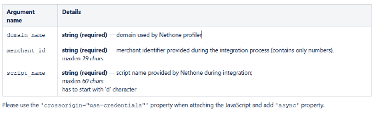
Script Inclusion
The following code snippet needs to be included in the page where merchant wishes to have the profiling. Usually this is Payment Page.
1<!-- javascript inserted at the bottom of body; merchant_id may be hardcoded or inserted by backend, crossorigin="use-credentials" property is mandatory-->2<script type="text/javascript" id="SCRIPT_TAG_ID" crossorigin="use-credentials" src="https://provided_name.nethone.io/s/{merchant_id}/dNfsXe.js" async></script>Script initializing function
Script initializing function (dftp.init) must be executed to gather user’s browser data. It should be called when the form has loaded. Function requires one argument, called options which is a JavaScript object with multiple properties.
Possible properties are:
attemptReference | string (required) – unique ID generated upon form view. It can not contain a prefix mznx- maxlen 128 chars |
sensitiveFields | list (conditionally required) – a list of strings containing sensitive field IDs. Behavioral data gathered for these fields will be stripped of sensitive information. Typically those would be the credit card number field (‘ccn’) and three-digit cvv field (‘cvv’) |
allowedFields | list (conditionally required) – a list of strings containing whitelisted field IDs. Full behavioral data will be gathered for these fields, without any information stripping. Typically those would be e.g. name or address fields. |
secretFields | list (optional) – a list of strings containing secret field IDs. No behavioral data will be gathered for these fields. Typically this would be the password field. |
attemptReference parameter
attemptReference is used to match the inquiry performed to the data gathered about a user by the profiling script. It must be a unique value generated upon every form view. You should never reuse attemptReference. In case of Single Page Applications do not reinitialize the profiling solution.
Behavioral data parameters
Handling of behavioral data gathered by the profiling script is controlled by sensitiveFields, allowedFields and secretFields parameters. Passing sensitiveFields and allowedFields controls how behavioral data from fields that are not otherwise specified will be treated. The possible modes of handling not specified fields are standard and alternative.
Standard mode:
This is the recommended mode. In this mode fields not otherwise specified will have full behavioral data gathered. Passing only sensitiveFields enables this mode, secretFields can be additionally passed.
Sample usage:
1dftp.init({2 attemptReference: '8b7115e0-49d2-438b-b88f-b265e44b156f',3 sensitiveFields: ['number', 'cvc'],4});5// or6dftp.init({7 attemptReference: '8b7115e0-49d2-438b-b88f-b265e44b156f',8 sensitiveFields: ['number', 'cvc'],9 secretFields: ['password'],10});Extra Consideration
Behavioral data gathered by the profiling script is grouped by form field IDs. It is highly recommended that all form fields have HTML IDs that remain stable over time.
Warning sensitive/allowed/secret fields MUST HAVE HTML IDs.
If any of the following is true:
fields do not have IDs in HTML code
HTML class property is passed instead of IDs
HTML name property is passed instead of IDs
ALL sensitive/secret key events (for example containing card data) may be sent to profiler.
Profiling completion
In order to ensure that all necessary profiling data was collected, it’s recommended to use dftp.profileCompleted function. It returns a Promise object that is resolved when we have completed processing and it’s safe to do an inquiry.
1Sample usage with modern JavaScript:2 3try {4 await dftp.profileCompleted();5} catch (err) {6 console.error("Profiling failed with err: " + err);7}8doWorkAfterProfiling();9 10 11Sample usage with Promises:12 13dftp.profileCompleted().catch(err => console.error("Profiling failed with err: " + err)).finally(doWorkAfterProfiling);14 15 16doWorkAfterProfiling can be a function used to submit form data and perform the inquiryProfiling script & page lifecycle
The profiling script must be loaded and initialized only once per page lifecycle. You can check for presence of the dftp object to avoid loading the script again. If the user makes repeated transactions without reloading the page you should keep using the same attemptReference when making an inquiry.
Sample payment page template and profiling script implementation
1<html>2<head>3</head>4 5<body>6 <!-- payment form -->7 <form id="payment-form">8 <label>9 Name:<br>10 <input type="text" name="name" id="name" class="form-element">11 </label>12 <br>13 <label>14 Credit card number:<br>15 <input type="text" name="ccn" id="ccn" class="form-element">16 </label>17 <br>18 <label>19 Expiration date:<br>20 <input type="text" name="expiration" id="expiration" class="form-element">21 </label>22 <br>23 <label>24 CVV:<br>25 <input type="text" name="cvv" id="cvv" class="form-element">26 </label>27 </form>28 <!-- payment form end-->29 30 <!-- button which is used for sending data, calls dftp.profileCompleted inside sendForm wrapper-->31 <button id="send" onclick="sendForm()">Pay</button>32 33 <script>34 function validateFormAndSend(){35 // isValid is the merchants function used for card data validation36 if (isValid()) {37 // merchant function used for sending data to server38 sentPaymentData();39 } else {40 // merchant function used for displaying card data errors on the form41 displayValidationErrors();42 }43 }44 45 // function for handling case when script from profiler URL cannot be loaded and dftp object does not exist46 function sendForm() {47 if (window.dftp){48 dftp.profileCompleted().catch(err => console.error("Profiling failed with err: " + err)).finally(validateFormAndSend);49 }50 else {51 validateFormAndSend();52 }53 }54 </script>55 56 <!-- javascript inserted at the bottom of body; merchant_id may be hardcoded or inserted by backend, crossorigin="use-credentials" property is mandatory-->57 <script type="text/javascript" id="SCRIPT_TAG_ID" crossorigin="use-credentials" src="https://provided_name.nethone.io/s/{merchant_id}/dNfsXe.js" async></script>58 59 <!-- javascript initializing profiling -->60 <script>61 var scriptID = "SCRIPT_TAG_ID"; // ID of <script> tag where our script is being loaded62 var options = {63 attemptReference: "{attempt_reference}", // inserted by the backend64 sensitiveFields: ["ccn", "cvv"]; // list of sensitive fields65 };66 67 if (window.dftp) {68 dftp.init(options);69 } else {70 var el = document.getElementById(scriptID);71 el.addEventListener("load", function () {72 dftp.init(options);73 });74 }75 </script>76 77</body>78</html>Support
This is fully depending on the type of payment used, at the moment we have this available for:
Credit Card
SEPA Direct Debit
PayPal
Sequence diagram
Pre-Auth using HPP

Paygate interface
Definitions
Data formats
Format | Description |
a | alphabetical |
as | alphabetical with special characters |
n | numeric |
an | alphanumeric |
ans | alphanumeric with special characters |
ns | numeric with special characters |
bool | boolean expression (true or false) |
3 | fixed length with 3 digits/characters |
..3 | variable length with maximum 3 digits/characters |
enum | enumeration of allowed values |
dttm | ISODateTime (YYYY-MM-DDThh:mm:ss) |
Abbreviations
Abbreviation | Description | Comment |
CND | condition | |
M | mandatory | If a parameter is mandatory, then it must be present |
O | optional | If a parameter is optional, then it can be present, but it is not required |
C | conditional | If a parameter is conditional, then there is a conditional rule which specifies whether it is mandatory or optional |
Notice: Please note that the names of parameters can be returned in upper or lower case.
Calling the interface
Authorization Request
To carry out an AI Protect check via a Server-to-Server connection, please refer respective payment method Payments by Credit Card, Payments by Direct Debit, PayPal V2
The parameter attempt_reference need to be included in addition to the respective parameters of each payment type.
Key | Format | CND | Description |
attempt_reference | String maxlen 128 chars | R | Unique Id generated during invoking of profiling script |