"Optional" flag
Functions that are flagged as "optional" within Computop Analytics might not be enabled within Analyticsyou are using. Computop Sales will be happy to enable these functions for you when necessary.
In order to activate fraud prevention, the tab "Fraud prevention" (optional) must be enabled for you within Analytics. You can use fraud prevention to blacklist card, account or device data, to view the blacklisted card, account or device data, to authorise credit card ranges and to view authorised credit card ranges. As an additional security measure, you can have velocity checks configured in your Computop Paygateby Computop Helpdesk.
Velocity checks
Velocity checks can only be created and viewed by Analytics.
Please contact Analyticsto have velocity checks changed, created or removed.
Velocity checks are tools used to check parameters that are automatically queried each time before a payment process is created. A rule could, for example, be that a maximum of two payments are permitted using the same credit card within a given period of time.Analytics gives you the option with the tab Black List SecurePay to search for records within the blacklist imposed by velocity checks, or to delete them. The tab White List SecurePay allows you to exempt card, account or device data from the velocity checks. These card, account or device data may then be used to create payment process without limits given by velocity checks.
Overview of fraud prevention
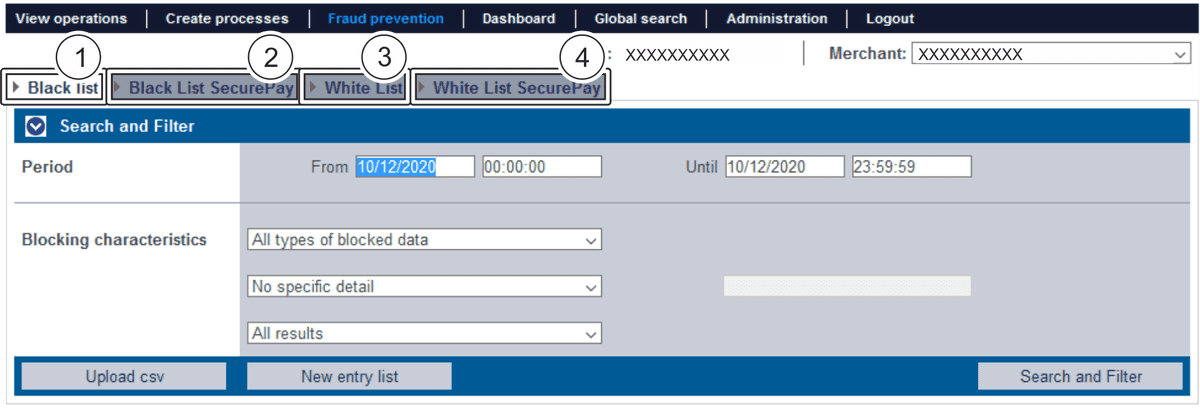
View blacklisted block card, account or device data, and blacklist card, account or device data
View card, account or device data blacklisted by the velocity checks
Search for and create authorised BIN (bank identification number) ranges
View card, account or device data exempted from the velocity checks